Creative Communities of the World Forums

The peer to peer support community for media production professionals.

Activity Forums VEGAS Pro Clip Length in bottom right GONE – V23 (302)

  • Clip Length in bottom right GONE – V23 (302)

    Posted by Dave Stuck on June 13, 2026 at 1:11 pm

    Did a Microsoft W11 update and just launched Vegas Pro 23.

    I rely on the clip length (normally in the bottom right of the interface. Usually have clip start, clip end and then length. The length is now gone. Did I do something or is there something i can do to see this again? I’m usually set to Time & Frames.

    Thoughts?

    Dave Stuck replied 2 months, 2 weeks ago 1 Member · 0 Replies
  • 0 Replies
  • Silviu Negoita

    July 20, 2026 at 1:48 pm

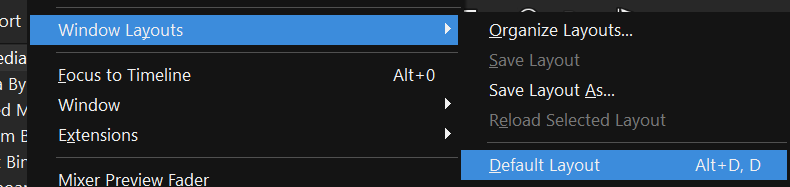
    Hello! This is most likely not caused by the Windows Update. First, please check that the status bar under VIEW is enabled.If this doesn’t work I would recommend reseting the layout by going to VIEW – WINDOW LAYOUTS – DEFAULT LAYOUT. If that doesn’t solve it, let me know your exact build of VEGAS 23 and whether the problem occurs in only this one project or in all of them.

We use anonymous cookies to give you the best experience we can.
Our Privacy policy | GDPR Policy