

Activity › Forums › Adobe After Effects Expressions › Circle shape and repeater
-
Circle shape and repeater
Posted by Hamood Hallak on July 17, 2023 at 4:00 pmHey there
I’m struggling with creating an expression
The idea is I want to create something that resembles the blend shape in illustrator between two circles, the path between them is only a single straight path … but I want to be able to move the starting and end circles and change the count or the spacing between them and the size of each
I’m sure there is a way to create that with a single circle shape and a repeater and linking positions to nulls and copy count acts as a spacer
Please help
Filip Vandueren replied 3 years, 2 months ago 2 Members · 18 Replies -
18 Replies
-

Filip Vandueren
July 18, 2023 at 8:47 amHi Hamood,
suppose there are two Nulls called “start” and “end” (they are not parented to anything.)
Make a shape layer, add a circle (and a stroke or fill)
Circle’s position gets this expression:
startPos = thisComp.layer("start").transform.position.value;
fromComp(startPos);
Add a repeater.
the Transform:Position parameter of the repeater gets this expression:
startPos = thisComp.layer("start").transform.position.value;
endPos = thisComp.layer("end").transform.position.value;
numCopies = Math.max(2,content("Repeater 1").copies); // minimum is 2 copies for start and end
(endPos - startPos) / (numCopies-1);
You can now change the “Copies” property of the repeater to get more inbetween steps.
(Or hook that up to a slider control)
-

Hamood Hallak
July 18, 2023 at 8:57 amthanks so much fillip .. that worked almost perfectly
the only issue is when i change the scale on the repeater …. the center of the end circle is shifted a bit from where the null is … is there a work around this … i think the math is not taking into account the diameter of the circle -
Hamood Hallak
July 18, 2023 at 9:16 ami fixed it by zeroing out all anchor point and position values
-
Filip Vandueren
July 18, 2023 at 9:25 amIf you want to change the scaling with the repeater, wet the repeater’s anchorPoint to be at the center of the original circle. Either by giving it the same expression:
startPos = thisComp.layer("start").transform.position.value;
fromComp(startPos);
or by simply pickwhipping to the circle’s position:
content("Ellipse Path 1").position; -
Hamood Hallak
July 18, 2023 at 9:30 amyeah its fixed somehow …. thank you so much for helping
if i can bother u with another questionif lets say i want the copy count between the start and end circled to be determined by the distance between them and maybe a slider to adjust that value
for example … every 100px distance .. it add a copy or two ( thats the value that the slider would determine ) -
Filip Vandueren
July 18, 2023 at 9:33 amBTW, because of how the repeater works, the scaling is applied mulitple times, so the final scale is depending on the number of copies. If you want to control this (for example the end should always be 300% larger than the start, you can use this expression for repeater:scale:
endScale = 3; //300%
numCopies = Math.max(2,content("Repeater 1").copies); // minimum is 2 copies
Math.pow(endScale,1/(numCopies-1)) * [100,100]; -
Filip Vandueren
July 18, 2023 at 9:47 amYes,
put an expression on “Copies”:
startPos = thisComp.layer("start").transform.position.value;
endPos = thisComp.layer("end").transform.position.value;
spacing = 100;
Math.ceil(length(startPos,endPos)/spacing);
It’s not going to be smooth, as extra circles pop into existance and they are distributed form start to end. So maybe that’s not exactly the look you are going for.
-
Hamood Hallak
July 18, 2023 at 9:53 amactually thats exactly the look im looking for … thanks alot ….
im just tryin g to link the scale of the circle to the start and end poition ..
its a bit tricky since the repeater scale is related to the actual circle scale ….im trying to solve this math here
-
Hamood Hallak
July 18, 2023 at 9:55 amsorry i mean link the scales of the circles to the scales of the nulls
-
Filip Vandueren
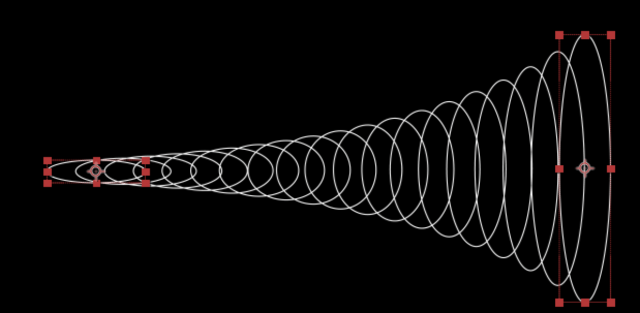
July 18, 2023 at 10:08 amBe aware: you cannot start from a 0x0 circle and scale that up to a larger circle.
Also, if the scales differ a lot, the scaling along the blend is always going to be noticeably exponential, not linear. (see screenshot) There’s no way around this if you are using the repeater.
That being said,
the original circle size gets this expression:
thisComp.layer("start").transform.scale.value;The Repeater’s scale gets this expression:
endScaleH = thisComp.layer("end").transform.scale[0]/thisComp.layer("start").transform.scale[0];
endScaleV = thisComp.layer("end").transform.scale[1]/thisComp.layer("start").transform.scale[1];
numCopies = Math.max(2,content("Repeater 1").copies); // minimum is 2 copies
[Math.pow(endScaleH,1/(numCopies-1)), Math.pow(endScaleV,1/(numCopies-1))]*100;
Reply to this Discussion! Login or Sign Up