Creative Communities of the World Forums

The peer to peer support community for media production professionals.

Activity Forums Adobe After Effects Expressions Checkbox Controlled Opacity

  • Checkbox Controlled Opacity

    Posted by Danni Runitz on November 2, 2020 at 9:41 am

    Hey!

    I’m new to expressisons.

    With the checkbox I can control the opacity on and off the this expressison.

    “if(thisComp.layer(“Adjustment Layer 4”).effect(“Checkbox Control”)(“Checkbox”)==1) 100 else 0″

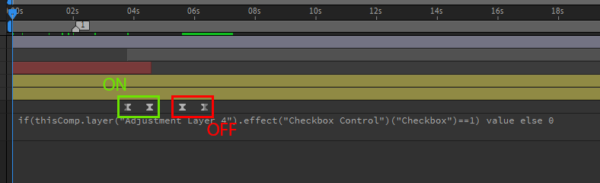
    But I want more control. So if the checkbox is off the layers opacity is 0, but when the checkbox is on I want to use the layers keyframes on opacity. Is that possible?

    Danni Runitz replied 5 years, 8 months ago 2 Members · 5 Replies
  • 5 Replies
  • Dan Ebberts

    November 2, 2020 at 11:00 am

    Try it like this:

    thisComp.layer("Adjustment Layer 4").effect("Checkbox Control")("Checkbox")==1 ? value else 0
  • Danni Runitz

    November 2, 2020 at 11:40 am

    Thanks dan!

    Made it work with this:
    if(thisComp.layer(“Adjustment Layer 4”).effect(“Checkbox Control”)(“Checkbox”)==1) value else 0

  • Danni Runitz

    November 2, 2020 at 11:54 am

    Okay. What if I want to go more advanced.

    So “on” only uses the 2 first keyframes and “off” only use the 2 last ones?

  • Dan Ebberts

    November 2, 2020 at 4:26 pm

    >Made it work with this:…

    A single-line if/else like that will only work with the Legacy ExtendScript engine (or an old version of AE).

    >What if I want to go more advanced…

    Try this:

    cb = thisComp.layer("Adjustment Layer 4").effect("Checkbox Control")("Checkbox");

    if (numKeys > 3){

    if (cb.numKeys > 0){

    n = cb.nearestKey(time).index;

    if (time < cb.key(n).time) n--;

    if (n > 0){

    t = time - cb.key(n).time;

    if (cb.value){

    t1 = key(1).time;

    t2 = key(2).time;

    }else{

    t1 = key(3).time;

    t2 = key(4).time;

    }

    tt = linear(t,0,t2-t1,t1,t2);

    }else{

    tt = (cb.value) ? key(1).time : key(3).time;

    }

    }else{

    tt = (cb.value) ? key(1).time : key(3).time;

    }

    valueAtTime(tt);

    }else{

    cb.value ? value : 0;

    }

  • Danni Runitz

    November 3, 2020 at 8:27 am

    Waow Dan! Thank you so much. Everything is working

We use anonymous cookies to give you the best experience we can.
Our Privacy policy | GDPR Policy