Creative Communities of the World Forums

The peer to peer support community for media production professionals.

Activity Forums Adobe After Effects Expressions Changing word color in the last of the text

  • Changing word color in the last of the text

    Posted by Tepi Kuncoro on July 18, 2024 at 1:13 pm

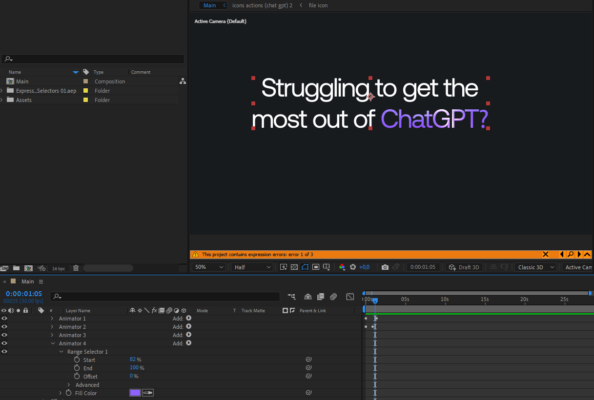
    Hello, I’m working on the template at the moment.. I want to change the color of the word, when I type many words the color will always affects only the last word (should be like in the screenshot)


    Thanks for taking the time to help.

    Tepi

    Brie Clayton replied 2 years ago 3 Members · 5 Replies
  • 5 Replies
  • Dan Ebberts

    July 18, 2024 at 2:25 pm

    One way would be to add an Expression Selector, delete the Range Selector, set the Expression Selector’s Based On to Words and use this expression for the Expression Selector’s Amount:

    textIndex == textTotal ? 100 : 0
  • Tepi Kuncoro

    July 18, 2024 at 2:34 pm

    Thank you so much! You’re a lifesaver

    And how about if 2 or 3 last words?

  • Dan Ebberts

    July 18, 2024 at 3:16 pm

    Like this:

    n = 2; // number of words to highlight
    textTotal - textIndex < n ? 100 : 0
  • Tepi Kuncoro

    July 18, 2024 at 3:23 pm

    That’s perfectly works, thank you!

  • Brie Clayton

    July 18, 2024 at 9:04 pm

    Thank you for solving this, Dan!

We use anonymous cookies to give you the best experience we can.
Our Privacy policy | GDPR Policy