Creative Communities of the World Forums

The peer to peer support community for media production professionals.

Activity Forums Apple Final Cut Pro Changing a luminance colour exported from C4d

  • Changing a luminance colour exported from C4d

    Posted by Keith Vickers on September 16, 2020 at 7:51 pm

    Hi guys I will be exporting a still image from Cinema 4d for use as a background in Final Cut. I will be using a pass which exports a luminance colour in order to be able to change the colour in FCP on-the-fly. In after effects the Set Channels effect can be used to do this. I don’t use FCP the video editor will be using it. Is there a similar workflow in FCP as the set channels efect in After Effects.

    I need to inform the editor how to change the colours of the luminance

    Thanks in advance guys

    Jeremy Garchow replied 5 years, 8 months ago 2 Members · 3 Replies
  • 3 Replies
  • Jeremy Garchow

    September 16, 2020 at 9:09 pm

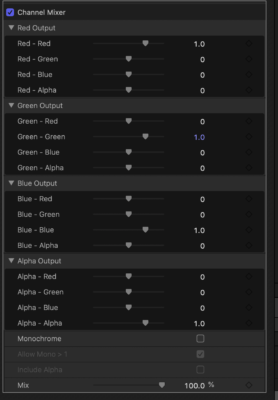
    There isn’t a built in effect, but one could easily publish the “Channel Mixer” effect from Motion that would be essentially the same as Set Channels in Ae with RGBA switching. Here’s what it looks like:

  • Keith Vickers

    September 16, 2020 at 10:33 pm

    Hi Jeremy, thank you for the interest and reply to my question. What is Motion is it part of FCP?

    Ah I see it is bundled with Final Cut Pro. Thanks.

  • Jeremy Garchow

    September 17, 2020 at 1:00 pm

    No, Motion is a separate purchase for $50 US.

We use anonymous cookies to give you the best experience we can.
Our Privacy policy | GDPR Policy