Creative Communities of the World Forums

The peer to peer support community for media production professionals.

Activity Forums Adobe After Effects Expressions Change the value only for the second keyframe in a position aplication

  • Change the value only for the second keyframe in a position aplication

    Posted by Sorin Gabriel on January 28, 2021 at 3:54 pm

    Hello all! I’m so glad that i made this step and joined this amazing community!

    I have a small problem, this worked out in the past for only one parameter (scale, opacity, rotation), but now i need for position, and get the error that i need it to be in 2 dimensions not one.

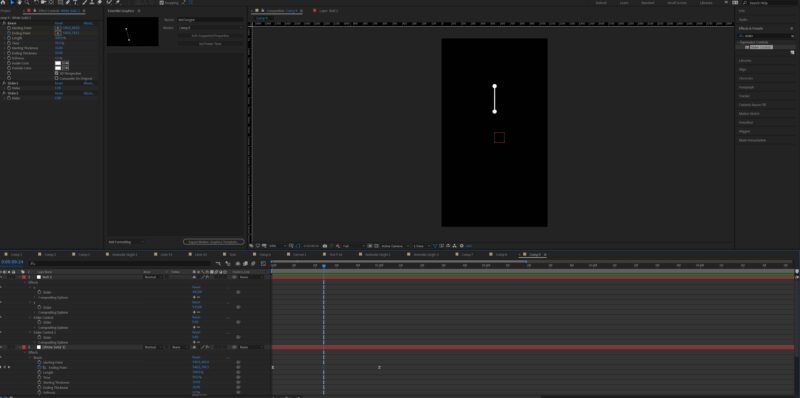
    So, to be more precisely, i want to keep my animation and change only the second keyframe that should contain x,y coordinates with slider controls, i need this for and essential graphics template.

    Hope that someone will understand what i want if not i can post more pictures.

    This line i want to make it dynamic so the user can choose where to point it and also keep it’s animation

    Kevin Camp replied 5 years, 3 months ago 2 Members · 4 Replies
  • 4 Replies
  • Sorin Gabriel

    January 29, 2021 at 2:03 pm

    anyone? 🙁 i really need this done, thank you again!

  • Kevin Camp

    January 29, 2021 at 4:35 pm

    it looks like you have two slider controls, I’ll assume you want one to control the x-position and the other to control the y-position of one end of the beam effect.

    If so, then try something like this on the beam point you want to affect:

    x = effect("Slider Control 1")("Slider") ; // point this at one slider

    y = effect("Slider Control 2")("Slider") ; // point this at the other

    [ x, y ]

    Alternatively you may be able to use a Point Control that natively has 2 dimensions. Then the expression would simply be this:

    effect("Point Control")("Point")

  • Sorin Gabriel

    January 29, 2021 at 5:47 pm

    Thank you Kevin! But I know this, i want to modify x an y correctly with a slider control, but as an addition I want the second key frame to have the new x,y values, anywhere i change the x,y values on the timeline… And not generate a third key frame.

  • Kevin Camp

    January 29, 2021 at 10:03 pm

    If you use a Point Control on the same layer that the beam effect is on and the ease on the keyframes is the standard easy-ease, this should work:

    p1 = key(1).value ;

    p2 = effect(“Point Control”)(“Point”) ; // pickwhip to your point control

    ease(time, key(1).time, key(2).time, p1, p2 )


    If you need to use sliders, then this should work:

    p1 = key(1).value ;

    x2 = effect(“Slider Control 1”)(“Slider”) ; // pickwhip to your x-position slider

    y2 = effect(“Slider Control 2”)(“Slider”) ; // pickwhip to your y-position slider

    p2 = [ x2, y2 ] ;

    ease(time, key(1).time, key(2).time, p1, p2 )

    If the ease on the keyframes is using a custom velocity then it will get a more complicated.

We use anonymous cookies to give you the best experience we can.
Our Privacy policy | GDPR Policy