Creative Communities of the World Forums

The peer to peer support community for media production professionals.

Activity Forums Adobe Premiere Pro Can’t Render files

  • Can’t Render files

    Posted by Mark Lyall on August 22, 2026 at 6:07 pm

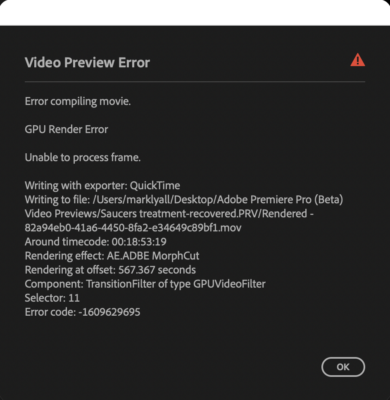
    I am using Adobe Premiere (Beta) Version 26.5.0 on A MacBook Pro M2 with 96 GB Memory on Tahoe 26.5.1. I have not updated anything since starting a 30 minute project. I am using Adobe Firefly for the footage. I have mixed 720 and HD footage together and used fit to frame on some shots. I am not sure, but I suspect that may be why I am receiving the error message? I was rendering the mixed footage fine then recently I can no longer render and this message (see attached) comes up. I am still able to view the footage and edit fine. Does it make the most sense that when I finish the project to make all the footage HD through Firefly and down load the latest version of premiere Pro and reassemble it Clip by Clip. Also, I plan to keep the existing film on the Beta Version while I assemble it on the Standard Premiere Pro. Does anyone see a problem, Have a solution or a better idea. Thanks as always.

    Mark

    Devrim Akteke replied 2 weeks, 5 days ago 3 Members · 4 Replies
  • 4 Replies
  • Devrim Akteke

    August 24, 2026 at 3:22 pm

    Hi,

    There could be a problem with that video file on that timecode on the message. You may try converting it before importing into Premiere and see if it works. If you come up with an error during convert, this file is the problem.

  • Mark Lyall

    August 25, 2026 at 12:32 pm

    The issue is there is no clip at that timecode. I have not gotten that far in the time line.

  • Mads Nybo jørgensen

    August 25, 2026 at 2:33 pm

    Hey Mark,

    What a pain.

    Are you able to roll back PPro to the previous version, or are locked-in on the new features?

    What happens if you setup a new project, and import the Sequence (TimeLine) and try again?

    Next I would try is to dissable the Morphcut, if you use it anywhere, and see if that will make the export happen?
    If not, maybe dissable the Firefly clips?

    I know this is counter productive, but if you a version exported, even with black holes in it, may be those individual clips will allow you to export those out one at a time, and re-insert on your exported (master) file.

    Because of error messages, I did late last year go through a painfull experience with PPro on a feature film, where I had to delete all the tracks, except the one which I exported out.
    Eventually all one at a time.
    In the end, I had to export ONE voice track, starting 2 mins at a time, building up to 10 mins chunks, before getting it all out, and reassemble the exported files in a new project.

    Adobe doesn’t really seem to care about stability, which is a shame.

    Hope this helps?

    Atb
    mads

  • Devrim Akteke

    August 27, 2026 at 7:17 am

    There could be a problem with render files if you have. You may try deleting render files, restart 🙂

    One of the AI videos could be causing trouble. As Mads mentioned, you may have to eliminate files and see the result. Maybe copying and pasting to a new sequence may help.

    Good luck. 🧐

We use anonymous cookies to give you the best experience we can.
Our Privacy policy | GDPR Policy