Creative Communities of the World Forums

The peer to peer support community for media production professionals.

Activity Forums VEGAS Pro Can Preferences be saved for Vegas reinstall?

  • Can Preferences be saved for Vegas reinstall?

    Posted by Doug Ray on August 13, 2021 at 7:27 pm

    I need to reinstall Vegas Pro 17. Is there any way to save all my preferences, and replace them after the Vegas reinstall?

    (Vegas 17 is suddenly crashing every 5 minutes, regardless of activity — even when simply viewing clips in trim window. The crash freezes Windows, requiring a system restart. Vegas is the only program causing the system crash. I’ve had no automatic Windows updates since May.)

    On the Vegas reinstall, I’d rather not recreate all my many preferences if I don’t have to!

    Thanks for any help.

    System:

    Intel i7-7700K CPU @ 4.20 GHz

    Windows 10

    Memory: – 32 GB

    Graphics Card: – NVIDIA GeForce GTX 1060 6GB

    Vegas program and operating system are loaded on internal SSDs

    Doug Ray replied 4 years, 11 months ago 2 Members · 4 Replies
  • 4 Replies
  • Red-rob Rothkopf

    August 13, 2021 at 9:28 pm

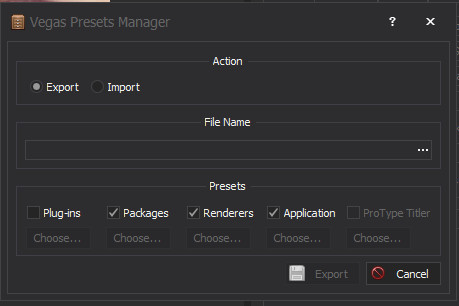
    If you have Vegasaur, its “Vegas Presets Manager” might help you with what you’re doing.

  • Red-rob Rothkopf

    August 13, 2021 at 9:32 pm

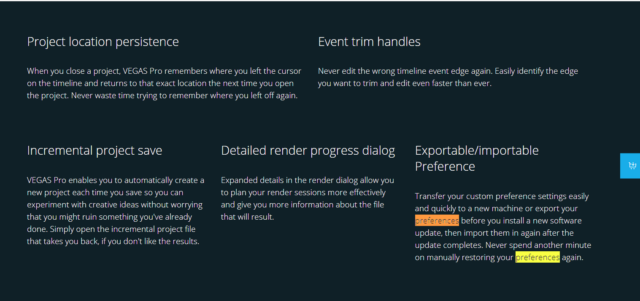
    Also. they say the “Export/Import” preference features was new for Vegas 18.. maybe 17 had it too (sometimes the marketing implies it’s new for a version but it’s been there in prior ones too)?

  • Doug Ray

    August 14, 2021 at 1:34 pm

    Thanks for your quick reply. I don’t have Vegasaur. Unfortunately, import/export preferences is only available on Vegas Pro 18 onwards. Rather than spend $100 on Vegasaur, I’ll get the Vegas 19 upgrade for $249. — And I’ll re-enter the preferences manually this time – hopefully the last time!

  • Doug Ray

    August 14, 2021 at 8:24 pm

    Thanks again for your responses. I learned that doing a reset of Vegas Pro 17 (including deleting all cashed application data) would be best – but still, Vegas crashes (freezes) almost immediately.

    CORRECTION TO FIRST POST: Windows does NOT crash when Vegas crashes. All other Windows programs and functions continue to work perfectly. When Vegas freezes, the Trim Event icon always appears (though I hadn’t used that function since opening Vegas), and it can be moved on the Vegas screen. But it doesn’t do anything, and all other functions in Vegas are frozen (including other choices on the tool bar).

    Again, the Vegas crash/freeze occurs within a minute or two after opening a new or existing project, regardless of the action – it’s can be as simple as loading a clip into the Trim window.

    Thanks again for any ideas. I’ve posted this the Magix, and am awaiting a reply.

We use anonymous cookies to give you the best experience we can.
Our Privacy policy | GDPR Policy