

Activity › Forums › Adobe Premiere Pro › Can I Replace This Sky?
-
Can I Replace This Sky?
Posted by Greg Bakun on December 31, 2010 at 9:25 pmHello,
I want to take out the sky in the pic below:
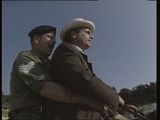
and replace it to something similar to this pic:

basically, I assume I would make the blue sky transparent so I can have another layer of video show up as the new sky. Is this something that would be better suited to be done in After Effects?
Thanks for your help!
Toby Gale replied 15 years, 8 months ago 5 Members · 4 Replies -
4 Replies


-

Vince Becquiot
December 31, 2010 at 10:14 pmHi Greg,
If you have CS5, that would be a perfect job for After Effects’ Rotobrush
Vince Becquiot
Kaptis Studios
San Francisco – Bay Area -

Craig Whitaker
January 1, 2011 at 7:30 amYes you can, but how much time you spend on it will make it or not. Another guy at work just did something like this in Nuke for a feature we have in right now. It’s a 340 frame shot. I can tell you that his final comp has significant amount of roti along with many different keys. Shots like this need every trick in the book and I can’t imagine getting an acceptable result with just one operation. I’d make several garbage mattes and then start with a few keys. Good luck!
-

Ann Bens
January 1, 2011 at 12:17 pmRotobrush is a good option.
For the older versions of AE this might still work: https://library.creativecow.net/articles/kramer_andrew/sky_replacement.php -

Toby Gale
January 2, 2011 at 9:09 pmyou could use the ultra key feature found in premiere pro, effects>keying>ultraKey
use the colour selector to select the sky.i like ultra key because it has alot of options for poor keying material however it usually works it out by itself.
for a quick fix you could colour grade the sae footage so they sky is the colour you want and put the old clip on the top layer with ultra key revealing the colour corrected sky.
not exactly elegant but should work. otherwise i could have a go at removing the sky with NUKEV6 for you im practising advanced keying.
Hope it helps
—————————————————-
Computer animation Student
—————————————————-
MACHINES
> Mac Book Pro 13” 4 gig Ram Nvdia320m intel dual core.> PC – 16GB Ram Quad core intel 1TB 2×24” HP monitors
SLI 2X nvidia Geforce GT9800 windows7 ultimate +ubuntuCAMERA
> Panasonic HDC SD700 2×8 GB
Reply to this Discussion! Login or Sign Up