Creative Communities of the World Forums

The peer to peer support community for media production professionals.

Activity Forums Adobe After Effects Camera View Question

  • Camera View Question

    Posted by Nik Yordanov on June 3, 2024 at 9:51 am

    Hi guys,


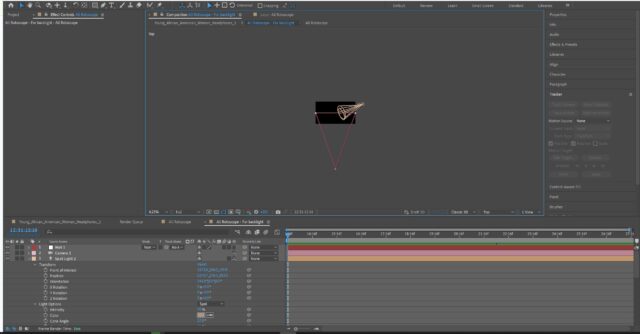
    I’d like to ask a question related to After Effects’ camera view options. Besides the Active Camera which is by default, I sometimes use the other options like Top view to be able to see the position of the lights and other elements. The problem is I’ve had cases where I switch to another view, and I get a preview with an actual picture and position of the lights. But that happened only 1 or 2 times in my projects, all the other cases I’ve had a black preview with only graphic lines of the lights, the camera and other elements, which isn’t the same and I’ve always found it confusing to work like that without being able to actually see what is where.

    I guess something must be switched/turned on for this to work, but I just can’t find what.

    Thanks,

    Nik

    Nik Yordanov replied 1 year, 11 months ago 2 Members · 2 Replies
  • 2 Replies
  • Walter Soyka

    June 3, 2024 at 1:36 pm

    There are a few things I can think of that might answer your question:

    Firstly, 2D layers won’t show in orthographic views (top, front, left, etc.), but they do show in camera views (although, of course, they do not react to the 3D scene).

    Secondly, if you are catching an image layer at its edge, you won’t be able to see it. That’s because the layer has no depth, and it’s not pointed at the orthographic camera.

    Lastly, if the image sits far away in the scene, it may be out of range of an orthographic view. You can’t orbit an orthographic view, but you can pan and dolly it to reposition the “active window” that the comp provides. (If you’re using the Advanced 3D renderer, you can turn on Draft 3D mode, and then enable the “Extended Viewer”, which will render the scene in the viewport, unrestricted by the boundaries that the comp settings provide.)

  • Nik Yordanov

    June 3, 2024 at 3:20 pm

    Hey Walter,

    Ahh, you’re right, I was so silly not to think about this. I also didn’t quite accurately do the screenshot, because my pre-comped layer that consists of an image background and a rotoscoped video (from a green screen) was turned to a 3D layer, but as you say, it has no depth, as it’s not really 3D. I did open another project that I made entirely with Element 3D, where I have an hdr environment and a few 3D models, and that’s where I’m able to see everything as I’d like from any camera viewer mode.

    Thank you

We use anonymous cookies to give you the best experience we can.
Our Privacy policy | GDPR Policy