Creative Communities of the World Forums

The peer to peer support community for media production professionals.

Activity Forums Adobe After Effects Camera Tracker Doesn’t Work: Please Help!

  • Camera Tracker Doesn’t Work: Please Help!

    Posted by Eric Tippett on October 29, 2020 at 12:05 am

    Hello,

    I’ve created the camera tracker with footage I found to learn the effect.

    I’ve created track points with an average error of 0.48. The points move and it all looks great.

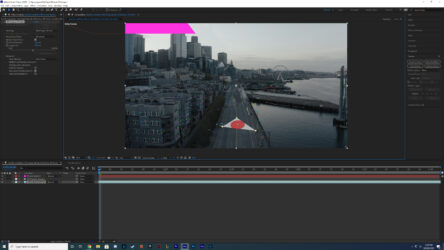
    Then when I click 3 points, right click and select create Solid and Camera, the Solid is created way off the 3 points I selected (and always offscreen), also the Solid doesn’t move and track with the points when I play the scene, it just stays in its position.

    Also I have tried to set different spots for the Ground Plane and Origin creation, yet that does nothing.

    Here is a photo to show the points I selected and also where the nonmoving solid is created way off the screen. I have followed all of the simple tutorials exactly, starting with Andrew Kramers, did exactly what he does and yet it’s broken for me.

    Please help, thanks!
    Blaise Douros replied 5 years, 6 months ago 2 Members · 1 Reply
  • 1 Reply
  • Blaise Douros

    October 29, 2020 at 5:38 pm

    Once you’ve set the Ground Plane and Origin, what happens if you set the position of the Solid to 0,0,0? That should set the position of the Solid to the Origin you’ve specified (I assume you want it to match the Ground Plane you’ve set in the image you posted?

    The other thing I like to do is to jump into the 3D view and see if the camera is actually moving the way you expect it to–sometimes the Tracker can spit out a weird, reversed result that isn’t reflective of the actual motion.

    It also looks like your footage has been graded–one thing I like to do, in order to get higher-quality tracks, is to pre-comp a copy, and then mess with the brightness and contrast to give the tracker a better image to work with (graded footage isn’t always ideal for tracking). You can always delete the pre-comped version after you’ve pulled a good track.

We use anonymous cookies to give you the best experience we can.
Our Privacy policy | GDPR Policy