Creative Communities of the World Forums

The peer to peer support community for media production professionals.

Activity Forums Adobe After Effects Cached Frames?

  • Cached Frames?

    Posted by Chip Hess on April 14, 2022 at 11:16 pm

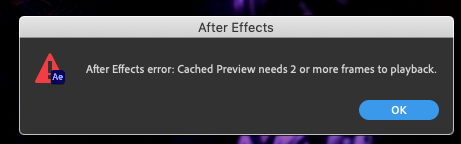
    An error started showing up recently, when hitting either space bar or 0 for playback.
    Is this a settings issue, or bug?

    AE 2020 17.7

    Mojave OS
    Chip Hess replied 4 years, 1 month ago 2 Members · 2 Replies
  • 2 Replies
  • Chris Voelz

    April 15, 2022 at 12:23 am

    It means you hit preview and play before the machine had a chance to cache any frames. The green bar above the comp timeline indicates how much has cached. Just hit preview and wait for some frames to cache before trying to play them back. I accidentally do this all the time.

  • Chip Hess

    April 15, 2022 at 3:36 pm

    Thanks!
    I did a search on the Adobe forum, and found this

    Preferences > Memory, and make sure “Reduce Cache size when system is low on memory” is NOT checked.
    I found this fixed it!

We use anonymous cookies to give you the best experience we can.
Our Privacy policy | GDPR Policy