-
C80 Transcode Playback Errors – Green Screen of Agony
Hi everyone,
I have a weird problem here.
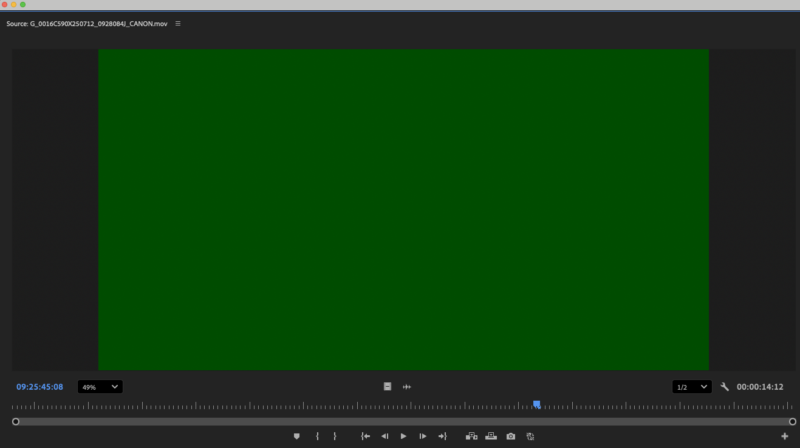
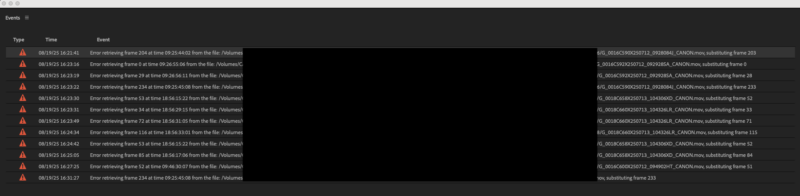
When I import my transcodes of Canon C80 footage into my project, I am unable to playback certain clips. Each time I double click to play the clip in my source monitor, I get an “Error retrieving frame 204 at time of 09:25:44:02 from the file, substituting frame 203.” Then the yellow media loading image pops up in my source monitor before the frame turns green. Some files remain green for playback while I can hear the audio and others allow playback but turn green when paused. They’re all taking a while to load when I try to watch them – disrupting my workflow just enough to be annoying.
This is only happening with the C80 footage I have and with seemingly random clips (the first 3 might play fine but the rest green out).
I tried making new transcodes as H.264s (the originals were Apple ProRes LT), but the problem persisted. I tested the transcodes in Resolve, which plays them back fine. I tested on a different computer with the same Premiere version (Mac Studio 2025, Apple M3 Ultra, Sequoia 15.5) and the clips play normally. Lastly, I tried creating a new project with only the C80 clips, but there was no change in the issue.
The computer I am on is a Mac Pro 2019, 3.2 GHz 16-Core Intel Xeon W. When I first noticed the issue I was on Ventura 13.6.9 for the OS and I updated to Sequoia 15.6 when the Mac Studio played the clips back fine. The problem was not resolved by this.
My questions are: Has anyone else run into this issue and have they found a solution?
*Note: I blocked out the folder naming of the files in the error image for NDA purposes.*