Creative Communities of the World Forums

The peer to peer support community for media production professionals.

Activity Forums Maxon Cinema 4D C4D Material Blender doesn’t seem to blend

  • C4D Material Blender doesn’t seem to blend

    Posted by Blake Goulette on January 23, 2024 at 5:16 pm

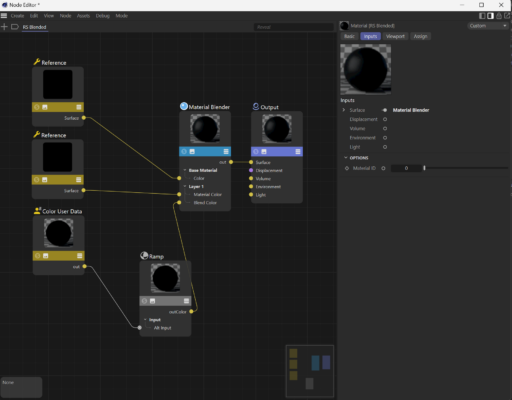
    Hi all. Extremely new to C4D and not terribly familiar with node-based shaders/materials, although I do have some understanding. That said, I cannot seem to get a material blender to function.

    My mograph color is working: if I ramp that and plug it into my material’s output, I see black and white that changes according to the mograph stuff I’ve added to my scene. As soon as I plug in my material blender, I see only my base layer material (a reference to another material): I never see my layer 1 material, despite having plugged my ramped color user data node into the blend color input of the material blender.

    Thanks for any help or direction!

    Kouraib Abdmalek replied 2 years, 3 months ago 3 Members · 2 Replies
  • 2 Replies
  • Usama Aslam

    January 24, 2024 at 12:12 am

    The material intensity should be in the middle of 0 to 100% to blend both materials. Open material blender node and do check that the layer 1 material visibility is enabled. Also, check the texture tags to ensure that the proper material is assigned. Refresh material preview in the node setup and test your preview with a quick render to see if it works as expected.

  • Kouraib Abdmalek

    January 24, 2024 at 9:56 am

    Hi,

    The problem may be with the reference materials because they are not supposed to appear black in the Node editor. I have put below a link of a good tutorial about blending materials. I hope it will be useful to you.

    Thanks!

    https://www.youtube.com/watch?v=aqoVvrrWZE4

    Some contents or functionalities here are not available due to your cookie preferences!

    This happens because the functionality/content marked as “Google Youtube” uses cookies that you choosed to keep disabled. In order to view this content or use this functionality, please enable cookies: click here to open your cookie preferences.

We use anonymous cookies to give you the best experience we can.
Our Privacy policy | GDPR Policy