Creative Communities of the World Forums

The peer to peer support community for media production professionals.

Activity Forums Adobe After Effects Building responsive bullet lists

  • Building responsive bullet lists

    Posted by Jenhadley on April 11, 2023 at 6:17 pm

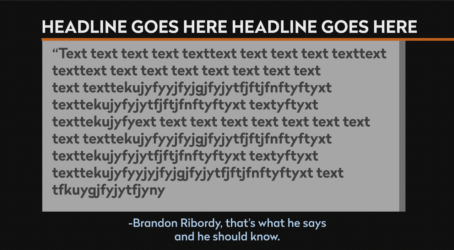
    I’m trying to build a responsive bullet list template. the bullet list is inside a rectangle, and the rectangle gets taller as it fills up with rows of text. At the bottom I need a line of text where I can credit the source of the info. I want that line of text to move up or down in relation to the height of the rectangle. So, I think I need to connect the Y position of the text box to the height of the white rectangle. I’m an expressions newbie, and I’ve been using KlutzGPT to try to figure it out. But no luck so far. And I haven’t found an appropriate tutorial on this yet. But I feel like this must be a simple thing. I’m attaching a similar graphic as an example. The name at the bottom of the screen should follow the lowest edge of the white rectangle. Help?
    Chris Voelz replied 3 years, 4 months ago 3 Members · 3 Replies
  • 3 Replies
  • Yoan Boisjoli

    April 12, 2023 at 12:45 am

    Hi Jenhadley!

    If you don’t want to mess with expressions, you could always check the script Pins & Boxes. It’s a very useful script that I use very often in these situations.

    If you wanna do it by expressions, let us know and we’ll think of something for sure!

  • Jenhadley

    April 12, 2023 at 4:03 pm

    I will check it out! Thanks much😊

  • Chris Voelz

    April 13, 2023 at 4:49 am

    You just need the height of the box and an association to place it in space. You can use the anchor point of the box and sourceRecAtTime to find the height. Pin the anchor point at the top of the text box. Then on the position value of your name layer add an expression to calculate the height, add, a padding, and add it to the y value of the text box.

    textBox = layer(“box”);
    height = textBox.sourceRectAtTime.height;
    textBoxPosY = textBox.transform.position[1];
    pad = 25;
    x = value[0];
    y = textBoxPosY + height + pad;
    [x,y]

    Something like that.

We use anonymous cookies to give you the best experience we can.
Our Privacy policy | GDPR Policy