

Activity › Forums › Apple Final Cut Pro › Bouncing project Error -41562
-
Bouncing project Error -41562
Posted by Shane Collins on September 16, 2020 at 11:13 amHey guys,
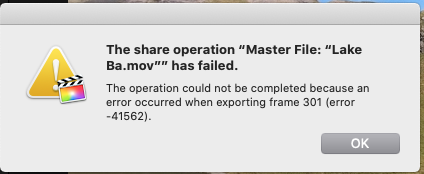
I recorded some drone footage and I am trying to make a video out of it and bounce it, but It’s failing with the below error
”The operation could not be completed because an error occurred when exporting frame 301 (error -41562)”
Any ideas? I have deleted rendered files, started a new project, converted the original video to a different format to try again but the same issue every time. It’s odd.
 Patrick Donegan replied 6 years ago 4 Members · 8 Replies
 -
8 Replies
-

Jeremy Garchow
September 16, 2020 at 11:21 amTry removing the quotes and colon from the file name, and try again.
-
Shane Collins
September 16, 2020 at 11:28 amHi Jeremy, there is no quotes or colon’s in the name i bounce, the error message just highlights the name with those
-
Shane Collins
September 16, 2020 at 1:02 pmI resolved this myself. I right-clicked in the browser on the clip causing the issue and used the option ‘analyze and fix’ and it bounced straight away,
-

Joe Marler
September 17, 2020 at 4:36 pm“Analyze and fix” fixes color and audio problems, not clip or cache corruption issues. It may have “fixed” it the same way kicking a TV clears up the picture — IOW it’s coincidental or indirect.
If 3rd party plugins are used, “analyze and fix” essentially adds an additional effect which might jiggle the software code path to temporarily bypass the problem. Multithreaded code often contains timing and race conditions whereby tiny windows of time momentarily overlap to produce a bug, then it seems to fade away, sometimes after making an apparently unrelated change. Then it later comes back because the underlying problem was not fixed.
It would be useful to know what 3rd party Fx are in use and what camera codec.
-

Patrick Donegan
September 18, 2020 at 5:21 amAre you saying that you use a bounce effect on your drone footage?
Which bounce effect?
-
Joe Marler
September 18, 2020 at 10:52 am“Bouncing” is an audio editing term. In multitrack analog recording, it originally meant mixing several tracks and moving that mixdown to an available track to free up other tracks for additional recording. In the digital era “bouncing” came to mean rendering audio metadata to intermediate files (analogous to FCPX cache files) to avoid CPU overhead, or to output files. I’ve never heard it applied to video editing.
-
Patrick Donegan
September 22, 2020 at 7:33 pmI have herd it called ‘freezing tracks” in audio DAW.
So I have no idea what it means here.
Reply to this Discussion! Login or Sign Up