Creative Communities of the World Forums

The peer to peer support community for media production professionals.

Activity Forums VEGAS Pro Bouncing Full tracks out

  • Bouncing Full tracks out

    Posted by Barry Payne on February 4, 2021 at 9:16 pm

    Hi
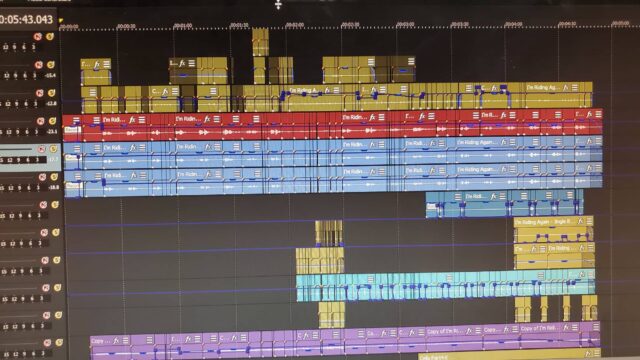
    I got a version of Vegas Pro 16/PC in order to bounce a multitrack audio session out to import into LogicProX/Mac. After importing, the tracks come in completely snipped as it appears in Vegas (see attachment). Some tracks have dozens of edit points. Not sure why they even exist. Possibly the producer cut for timing? Does Vegas have a function/process to export all tracks in place as full tracks, so when imported into LogicProX it comes in as one full track in place for each track exported in the session file? Help!

    Barry Payne replied 5 years, 2 months ago 3 Members · 6 Replies
  • 6 Replies
  • Richard Swain

    February 4, 2021 at 9:30 pm

    I can’t see the attachment

  • Red-rob Rothkopf

    February 4, 2021 at 11:22 pm

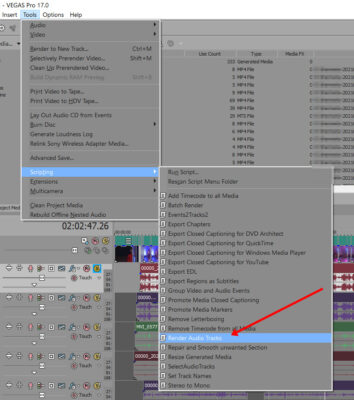
    If what you’re looking to do is export just the audio tracks that are in your file, each track as a unique file, check out Tools.Scripting.ExportAudioTracks.

  • Barry Payne

    February 6, 2021 at 3:30 am

    Oooops! Sorry. here it is.

  • Barry Payne

    February 6, 2021 at 3:31 am

    Awesome! Thank you. I’ll give that a try.

  • Barry Payne

    February 6, 2021 at 3:32 am

    Richard,
    It doesn’t seem to be uploading for some reason. Anyway, looks like Rob has a solution for me.

    Thanks all the same.

    b

  • Barry Payne

    February 6, 2021 at 3:34 am

    There it is.

We use anonymous cookies to give you the best experience we can.
Our Privacy policy | GDPR Policy