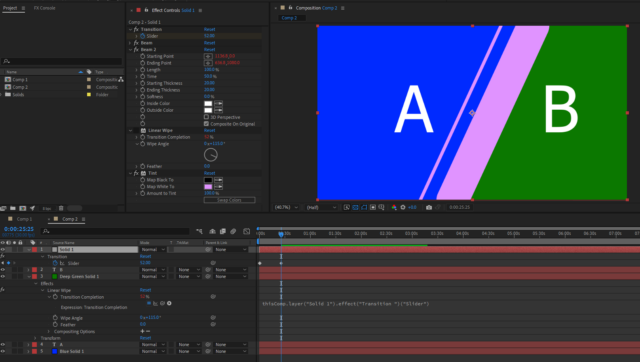
-
best way to accomplish wipe transitions without precomps?
Most of the wipes I’m seeing are using big thick shapes that cover the entire screen. So basically wipe on, then wipe off. That works perfectly for pretty much anything because you just line up the center of that with where you want to transition from one set of things to another, and you don’t have to worry about masking.
But if you need to mask off a set of layers, and mask On a set of layers, I’m wondering the best/easiest (I know those aren’t usually the same) way of accomplishing that.
I don’t want to precompose because I am working on projects that have a really short timeline, and precomposing just doesn’t work that well in my head. I’d be totally into it if Adobe let you kind of open up a precomp within the same timeline so you could edit in place more easily, but they don’t, so I only use them when Really needed.
So what I’m doing now is creating my wipe, with some shapes, and I have one layer that masks everything. Then I just create a set matte to reveal the layers on top. I then copy and paste that to all the layers that need it. Usually, it’s just 2 or 3 text layers, maybe a shape layer or two, and maybe some video footage. So it’s not a Ton, but that method still seems like there’s room for improvement. For one, set matte sucks because it doesn’t work when a layer doesn’t match the comp size. So you either have to precompose that (which creates more work if you need to use expressions, which adds a little time) or I create a solid on top of that, apply the set matte effect to that, and then use that solid as a track matte. That creates even more layers, which I’m not a fan of. I already have a hundred+ layers. I don’t need more if I can help it.
I’m just wondering if there’s a way to build something in a way that masks footage without having to do that. Maybe there’s a way to mask footage from my mask layer? Like, mask layer 60-66, as a range rather than having to manually add effects to those layers? AE doesn’t have linear A/B effects right? So I’m curious how that would work. I’m sure I’m just missing something obvious.