-
Best Practices for Optimizing Expression Code for .Mogrts?
Hi new to this forum so apologies if this bible exists somewhere already.
I am wondering what are some expression tips/tricks to speed up the processing and render times of a heavily coded .mogrt?
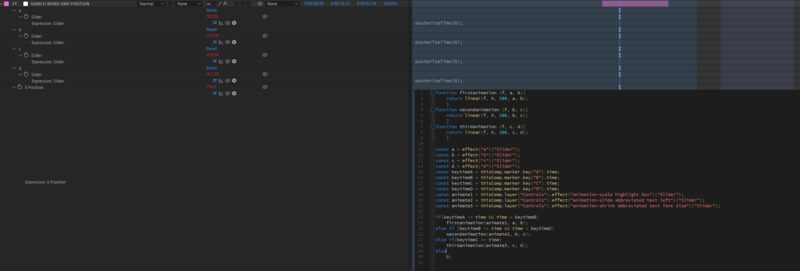
I use posterizeTime(0) on all static values (Can you use inside a function so only part of the expression is calculated once? I haven’t had success with that). Recently I thought I was quite slick and converted all dynamically calculated values to individual sliders with a posterizeTime(0) on each, and then ran a series of linear expression triggered by markers to animate between. Sadly this backfired and slowed down the export instead of speeding it up.
I also just learned to precompose the template and add hold keyframes where applicable to theoretically freeze any calculations that would be unnecessary. (I think it worked?) I am also in the process of learning how to use a .jsx footage file to house some global expressions but it’s a bit of a head scratcher for a wanna-be-coder.
Any help would be appreciated! I just finished a cool (to me at least) template where I gave the editors the ability to highlight key words in a headline and then pull a new, smaller text box and shift it around. Just wish it didn’t take as long to export in premiere, and I’m sure there are more things I could do to speed it up. Sure does suck making something only to have it not be used because it’s too “slow” in premiere.
I should add that most templates I make have the time protected region enabled for extending in premiere, so the graphics can become quite long and the calculations can add up quickly.
Working on the most updated CC 2020 with the new Javascript Engine on a Windows. Added some photos of the linear expression code that was slow and the headline in its stages of animation.
Thanks!
Will