Creative Communities of the World Forums

The peer to peer support community for media production professionals.

Activity Forums Adobe After Effects Basic Text Animator

  • Basic Text Animator

    Posted by John Sappo on March 25, 2021 at 2:48 pm

    Hi-

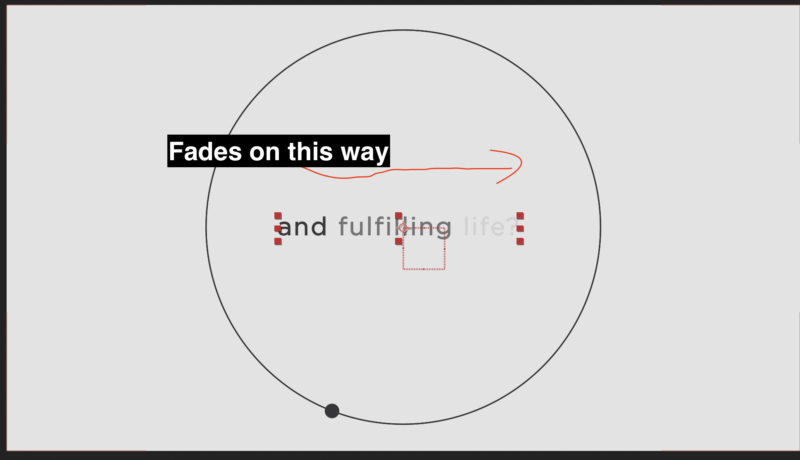
    this might seem so basic to some but I have a simple text animator that fades the text on screen. See image attached.

    The fade moves to the right, and after the text is on screen for a bit, i want it to reverse the way it appeared. When i keyframe the offset value back to the starting value the fade starts from the left again. how can i reverse this?

    Thank you kindly in advance.

    John Sappo replied 5 years, 4 months ago 3 Members · 4 Replies
  • 4 Replies
  • Patrick Grossien

    March 25, 2021 at 2:59 pm

    Try not using the offset, but the start/ end values for fade in/out stuff. The offset is if you set a range and want to move text parts … something like that: ooooooOOOOoo — oOOOOooooooo

  • Joe Burke

    March 25, 2021 at 3:01 pm

    Hi John,

    I was able to get this to work by doing the following.

    – set the opacity to 0%

    – Start=0

    -Offset=0

    – Keyframe the End from 100% to 0% then back to 100%

    See attached AE file.

    Is this want you are wanting to do?

  • John Sappo

    March 25, 2021 at 3:35 pm

    WOW! Thanks for the fast replies, and test file you provided Joe!

    It’s very close.

    The start / end values makes more sense. I will adjust that.

    Thank you both. ?

  • John Sappo

    March 25, 2021 at 3:59 pm

    Joe-

    I added a line of text to the test file and set up the keyframes similar to the example you provided.

    Two things:

    1) I can’t achieve a similar fade, the text just pops on in this setup. This is kinda cool, but how I do preserve it if desired?

    2) The text fade appears on screen from left to right, how I get it to fade out from left to right also?

    I re-attached the test file with my added line of text.

    Thanks again in advance!

We use anonymous cookies to give you the best experience we can.
Our Privacy policy | GDPR Policy