Creative Communities of the World Forums

The peer to peer support community for media production professionals.

Activity Forums Apple Final Cut Pro Basic Organisation – folders within Events…

  • Basic Organisation – folders within Events…

    Posted by Michael Halliday on December 14, 2020 at 12:28 am

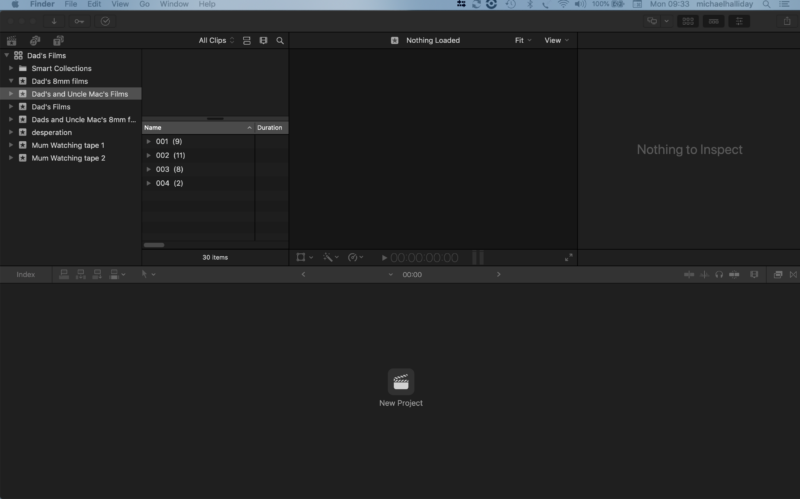
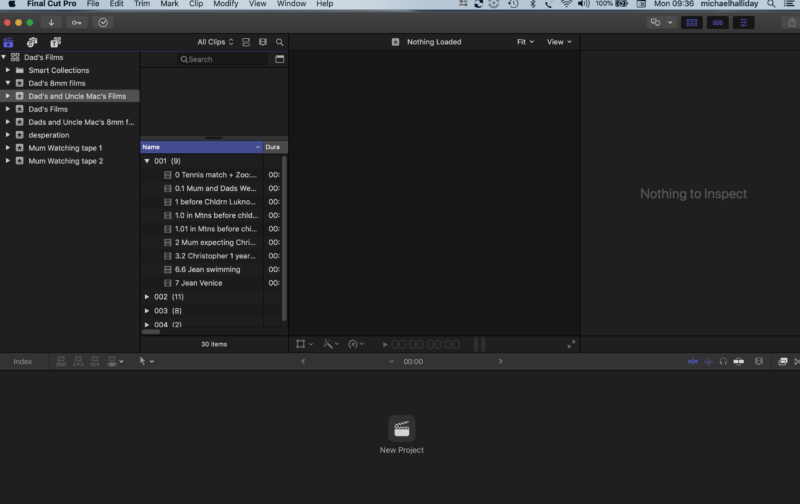
    Hi there, can anyone tell me how I can avoid this: on importing media files (30), from a folder on my computer’s internal hard drive, fcpx puts files them into its own groups: 001, 002, 003 and 004 – some kind of invisible folders where all you can see are these numbers and ‘reveal triangles’ until you click on the triangles to reveal the contents…

    I would like to have all 30 files in one event…which is how they were in my last Library, and how they are in a folder on my computer’s hard drive…but not matter how I drag, I cannot get the files to exist outside these arbitrary numbered groups…

    Does anyone know how to remove these invisible folders – so that I can put the files in the correct order…?

    Regards,

    Mike

    Michael Halliday replied 5 years, 5 months ago 3 Members · 4 Replies
  • 4 Replies
  • Jeremy Garchow

    December 14, 2020 at 1:12 am

    Are they folders or keyword collections? Do you mind posting a screengrab ?

  • Michael Halliday

    December 14, 2020 at 9:41 am

    Hi there Jeremy, they seem to be folders… I have not made any attempt to invoke key words…and none of the sorting options in the browser makes a difference. You can see that I had several attempts to move the files around in order to try and remove the ‘folders’…

  • Joe Marler

    December 14, 2020 at 12:13 pm

    Those are not folders but group categories. You probably have enabled a GROUP BY setting such as “by reel”, which is the number shown. In the Clip Appearance and Filtering menu (press button to left of magnifying glass at upper right of browser), select GROUP BY = None.

  • Michael Halliday

    December 14, 2020 at 4:28 pm

    Thank you Joe, exactly right! Don’t know how I designated “by reel” but “none” got rid of it for sure…that has changed my life for the moment!

    Thanks again,

    Mike

We use anonymous cookies to give you the best experience we can.
Our Privacy policy | GDPR Policy