Creative Communities of the World Forums

The peer to peer support community for media production professionals.

Activity Forums Apple Final Cut Pro Background and green screen blending

  • Background and green screen blending

    Posted by Philip Evans on May 11, 2021 at 4:40 am

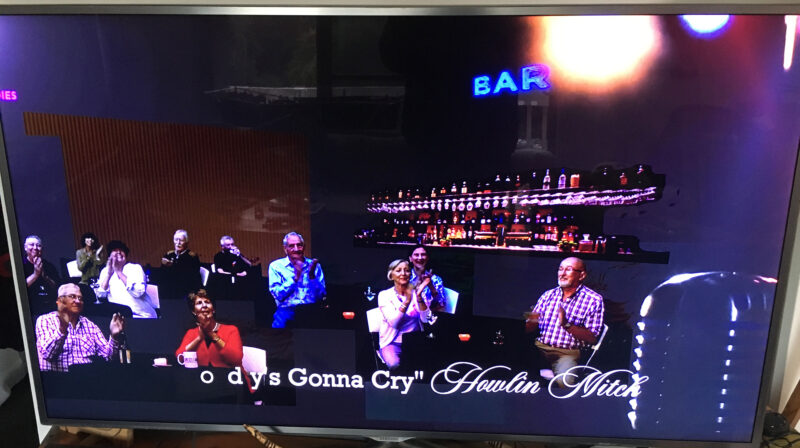
    Hi, I have a situation where I’m trying to create a fake audience for a live music video. It’s supposed to look like a dark, small bar music venue. I’ve succeeded by shooting several couples seated at a table on a green screen and substituting a bar photo in the background.

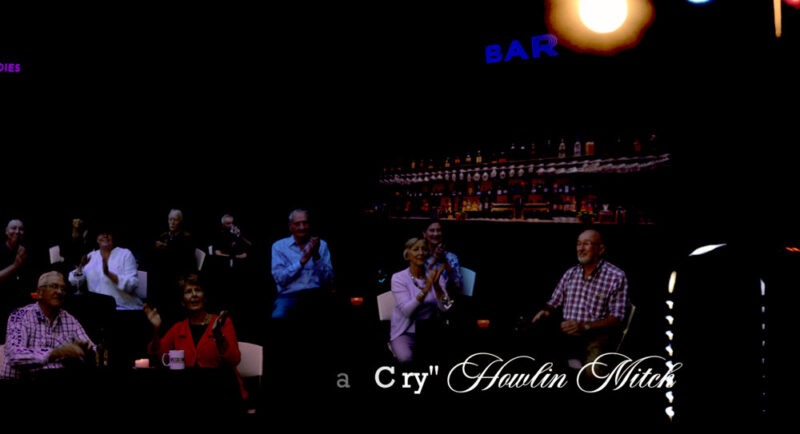
    It looks fine on my Mac in FCPx but when I play it on my TV, I can see the black background as grey, revealing my cropping and editing. Not good. I’ve tried placing a back solid layer behind, making a compound clip, even exporting and re-importing as an mp4 but nothing seems to work.

    I know that my TV is set to ‘normal’ picture settings, so I’m afraid that this will show up on other TVs if they have their brightness settings a little high (some people like that).

    It looks fine on Vimeo, iPad, iPhone etc.

    Any ideas would be appreciated, thanks.

    Philip Evans replied 5 years ago 3 Members · 6 Replies
  • 6 Replies
  • Jeremy Garchow

    May 11, 2021 at 12:17 pm

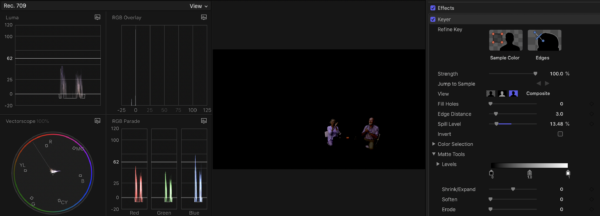
    What do the scopes tell you? Are the black levels all the way black where they need to be?

  • Paul Golden

    May 11, 2021 at 11:04 pm

    It sounds like you need to adjust your black level in your green screen key. Have you looked at the matte channel to see if the black is fully black or if there’s white schmutz (a tech term) in there. Are you using the FCPX keyer or something else?

  • Philip Evans

    May 12, 2021 at 2:39 am

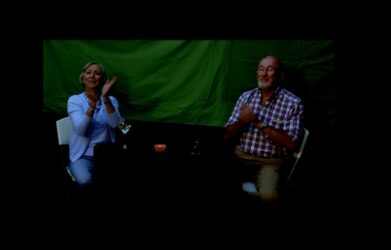
    Hi Paul, I’m using the FCPX Keyer, which is doing a great job of my poor green screen shooting. I’ve attached a pic of the from couple with the keyed off. The table they sit at has a black table cloth, which shows as black in the scene. The problem is the background on which the keyed elements sit. My TV is brightening the black background but not all the black elements, thus showing my cheats. I’ve tried a black solid behind everything but it makes no difference.

  • Philip Evans

    May 12, 2021 at 2:43 am

    Hi Jeremy, I’ve attached a pic of the front couple showing the scopes. I’ve purposely set the black level very low to get the ‘dimly lit bar’ effect.

  • Jeremy Garchow

    May 12, 2021 at 2:59 am

    How are you getting the image to your TV with the washed out picture?

  • Philip Evans

    May 12, 2021 at 3:20 am

    I’ve tried:

    Vimeo

    Youtube

    mp4 on usb

    I know my TV is the problem, but I just wonder how many other TVs out in the world are showing my secrets. I can’t understand why the background black isn’t staying black, while the real blacks in the shots are.

    Here’s a link to the full video:

    https://youtu.be/mfi-8_ir5Ug

    Any suggestions would be appreciated.

    Some contents or functionalities here are not available due to your cookie preferences!

    This happens because the functionality/content marked as “Google Youtube” uses cookies that you choosed to keep disabled. In order to view this content or use this functionality, please enable cookies: click here to open your cookie preferences.

We use anonymous cookies to give you the best experience we can.
Our Privacy policy | GDPR Policy