Creative Communities of the World Forums

The peer to peer support community for media production professionals.

Activity Forums Adobe Premiere Pro AVI files not playing well

  • AVI files not playing well

    Posted by Tom Galli on September 17, 2020 at 12:16 am

    I bought a “FauxPro” action camera, and overall, am satisfied. However, it recorde video as .avi, and the files do not make my Mac happy. I can bring them into Premiere directly, but there are glitches, bursts of static (audio and visual), green banding, mega-pixelization. I tried dropping them into Media ENcoder. Out of 5 files, 1 succeeded. 2 failed, giving me a “failed’ warning, the next one crashed the app.

    VLC plays them without any issue. I tried converting them using VLC, but it’s a bit of an annoying workflow, and worse, it loses the audio.

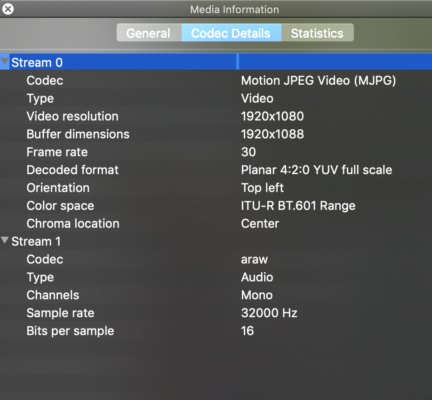
    I’m guessing there’s a codec somewhere I’m missing. Here’s what VLS has to say about the files:

    Ann Bens replied 5 years, 11 months ago 4 Members · 4 Replies
  • 4 Replies
  • Bret Hampton

    September 17, 2020 at 12:37 am

    Hi

    We need a lot more details. Exactly what camera, GoPro, Sunpak? Which model. Which Premiere version (don’t say latest, that just came out yesterday) Exact version like 14.0.3 or whatever.

    What do you mean you ‘brought them into Media Encoder”? Did you encode in some other format to get them to play? Which format?

    Sorry about all the questions but difficult to answer without them.

    Generally AVI is hardly used anymore in my experience. I’d expect it to record Cineform, H264, something newer. Most edit programs like video that easily plays back, like ProRes, Avid DnX, Cineform. H264 not so much, same with AVI. Your best bet is convert them all to the first two I mentioned. Files will be bigger but without your issues.

    You can try Facebook group Adobe Premiere Pro Editors on Facebook as these issues come up all the time there.

  • Todd Perchert

    September 18, 2020 at 2:50 pm

    I thought Motion JPEG was one of those 32-bit deprecated codecs that Apple dumped.

    Check around online.

    TC

  • Todd Perchert

    September 18, 2020 at 2:52 pm

    You would need to transcode to another codec/container. I would suggest ProRes Mov.

  • Ann Bens

    September 21, 2020 at 8:49 pm

We use anonymous cookies to give you the best experience we can.
Our Privacy policy | GDPR Policy