Creative Communities of the World Forums

The peer to peer support community for media production professionals.

Activity Forums VEGAS Pro Automatically mute audio when adding a re-recorded audio event

  • Automatically mute audio when adding a re-recorded audio event

    Posted by Maria Maronska on January 22, 2016 at 8:57 am

    Vegas Pro 12

    I have a movie with audio. Some parts of the audio had to be re-recorded. So I added a new audio track (ReRec) and added a Mute envelope to the original audio track. Since then, my workflow is as follows:

    1. place next re-recording event on the ReRec audio track
    2. double click on the original audio track envelope to set a first point
    3. double click on the original audio track envelope to set a second point
    4. drag the line between the points to mute the original audio
    repeat

    Is there a method to make the new ReRec audio events “opaque”, so that they would “cover” (mute) automatically all audio events on tracks above them? It would allow to get rid of steps 2, 3 and 4. For example on video tracks, if you place an opaque video event, you don’t have to manually “mute” (make invisible) video events on tracks above, they are automatically covered by the opaque video. The same would be nice to have with audio. Audio behaves as if it is only 50% opaque, it adds to the mix instead of replace other audio.

    Maria Maronska replied 10 years, 3 months ago 2 Members · 4 Replies
  • 4 Replies
  • Aleksey Tarasov

    January 22, 2016 at 12:13 pm

    Can you simply delete all original events that should be muted?
    You can also move them to a new track and mute that track.

  • Maria Maronska

    January 22, 2016 at 12:41 pm

    The original event is one long event, grouped with video. Re-recordings are many events, in many places. So I can’t delete the original event.

  • Aleksey Tarasov

    January 22, 2016 at 1:08 pm

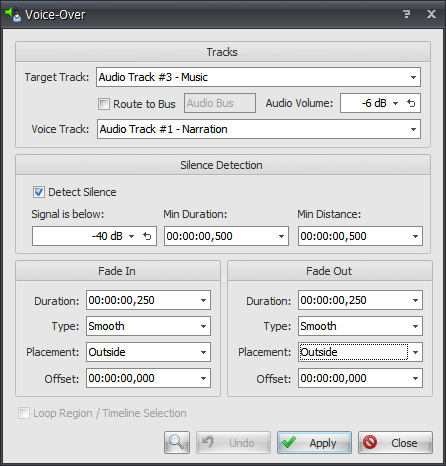
    Take a look at Voice over tool.

    Target Track – your original track.
    Voice Track – your “re-recorded” track.
    Set audio volume to minimum.
    Uncheck “Detect silence”, so it doesn’t analyze audio data, but looks for breaks in the “re-recorded” events.

  • Maria Maronska

    January 22, 2016 at 1:25 pm

    It looks like this tool would do exactly the thing I need, thanks for information. But it can’t be bought alone I guess, only with the whole Vegasaur, which is a bit expensive for me. So if there is no cheaper alternative, I’ll rather stay with manual workflow.

We use anonymous cookies to give you the best experience we can.
Our Privacy policy | GDPR Policy