Creative Communities of the World Forums

The peer to peer support community for media production professionals.

Activity › Forums › Adobe After Effects Expressions › Auto-slide Null to position on marker

  • Auto-slide Null to position on marker

    Posted by Hannes Holtermann on February 24, 2021 at 5:44 pm

    Hi everyone,

    I’m having difficulties getting the expression right for the following setup:

    Imagine a timetable with lots of different agenda items from top to bottom. Each agenda item is in it’s own layer precomposed and sequencially played in my main timetable comp (see attached photo). So every x seconds a new agenda item is shown at the bottom. Because I can only show two items at the time I have all items linked to a Null “Content Position” which position moves on the y-axis upwards for x pixels so that the top item slides out.

    What I want to archieve is to place markers on the Null and each time a marker is reached it reads the index of the marker, looks up the according agenda item (e. g. marker[1] -> “DI_01”) checks the height of the content within that comp (contentHeight = comp(“DI_01”).layer(“Content”).sourceRectAtTime().height) + margin) and moves Null “Content Position” up on the y-axis for the according amount of pixels. So it subtracts contentHeight from the current y-position.

    Here’s what I’ve got so far, but it’s not properly working. Can you push me into the right direction? (PS: I was also thinking about adding a slide controller to handle the offset but I don’t really know if that’s the best way to do it)

    <pre class=””><br></pre><p>day = "DI_";<br>layer = day;<br>margin = thisComp.layer("Content Position").effect("Margin")("ADBE Slider Control-0001");<br>offset = thisLayer.effect("Offset")("ADBE Slider Control-0001");<br>m = marker;<br>transitionTime = .5;<br>n = 0;<br>if (m.numKeys > 0){<br> n = m.nearestKey(time).index;<br> if (time < m.key(n).time) n--;<br>}<br>if (n > 0){<br> if(n < 10) {<br> layer = day + "0" + n;<br> } else {<br> layer = day + n;<br> }<br> s = eval('comp("' + layer +'").layer("Programm").sourceRectAtTime();');<br> addHeight = s.height + margin;<br> offset = addHeight;<br> t = time - m.key(n).time;<br> y = ease(time, n, transitionTime, value[1], addHeight);<br> value - [0,y]<br>} else<br> value</p><pre class="">
    Thanks a lot!
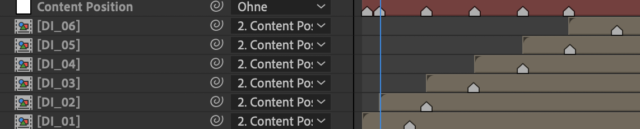
    Hannes Holtermann replied 5 years, 7 months ago 2 Members · 10 Replies
  • 10 Replies
  • Dan Ebberts

    February 24, 2021 at 6:47 pm

    Once your expression finds the current marker, I think it needs accumulate the heights for all the layers associated with previous markers. It looks like (I apologize if I’m incorrect about this) you’re assuming the the results of the expression’s previous calculations will be available as value[1], which is not the case (expressions have no access to values they previously calculated).

  • Hannes Holtermann

    February 24, 2021 at 7:05 pm

    Hey Dan,

    I guess your analysis is spot on. I was thinking that there is some sort of state saving. How would you handle this? Create a recurrsive loop to sum up all previous heights? Or is there a more elegant way?

  • Dan Ebberts

    February 24, 2021 at 8:14 pm

    Once you have the index of the most recent marker (n), you can use that to loop through all the comps associated with the previous markers and add up the heights + margins for the layers in those comps.

  • Hannes Holtermann

    February 24, 2021 at 9:24 pm

    <div>So I’m getting closer but something still seems off as at some markers the calculatioin doesnt seem to fit. Can you spot something I’m missing?</div><div>

    day = "DI_";
    margin = effect("Margin")("ADBE Slider Control-0001");
    m = marker;
    transitionTime = .5;
    n = 0;
    getContentHeight = function(layerID) {
    layerID--; // exclude current layer from calculation by subtracting 1
    if(layerID > 0) {
    if(layerID < 10) {
    layer = day + "0" + layerID;
    } else {
    layer = day + layerID;
    }
    s = eval('comp("' + layer +'").layer("Programm").sourceRectAtTime();');
    return s.height + margin;
    } else {
    return 0;
    }
    }
    if (m.numKeys > 0){
    n = m.nearestKey(time).index;
    if (time < m.key(n).time) n--;
    }
    if (n > 0){
    totalOffset = 0;
    for(i=0; i < n; i++) {
    totalOffset += getContentHeight(n);
    i++;
    }
        t = time - m.key(n).time;
    y = ease(time, n, transitionTime, value[1], totalOffset);
    value - [0,y];
    } else
    value

    </div>

  • Dan Ebberts

    February 24, 2021 at 10:46 pm

    It seems like your loop should be more like this:

    totalOffset = 0;
    for(i=1; i <= n; i++) {
    totalOffset += getContentHeight(i);
    }
  • Hannes Holtermann

    February 25, 2021 at 12:53 am

    Hmm, I guess that my marker detection is somewhat off because it’s only sliding up every second marker. Is looking for nearestKey the right thing to do if I want to push the content up as soon as the marker has been passed?

    Thanks a lot for your help, Dan!

  • Dan Ebberts

    February 25, 2021 at 12:58 am

    Did you catch the edit I made to my last post? It originally still had the i++ from your loop in there, which would make it skip layers. I changed it, but you may have seen the pre-edit version. I’m hoping that’s the issue.

  • Hannes Holtermann

    February 25, 2021 at 1:18 am

    Oh wow, you’re awesome. Thanks a lot. I forgot to remove it after changing from a while loop.

    I’ve also noted that a couple of markers where off by a couple of frames resulting in a wrong calculation by sourceRectAtTime().

    One last thing: Do you know why it’s not easing the animation? It’s just a jump cut. I’d love to do a ease out for 1s. But this doesnt work

    y = ease(time, n+1, n+2, value[1], totalOffset);
    value - [0,y]
    with n being 
    if (m.numKeys > 0){
    n = m.nearestKey(time).index;
    if (time < m.key(n).time) n--;
    }

    Muchas gracias!

  • Dan Ebberts

    February 25, 2021 at 1:57 am

    Ah. If you want it to ease, you need to calculate the offset due to all the prior markers, as well as the offset that includes the most recent marker. Then you need the times for the most recent marker and the one before that and set your ease up to use those times and offsets. Something like that.

  • Hannes Holtermann

    February 25, 2021 at 9:13 am

    Ah, ok. So I’m getting the offsets like this (just for anyone interested)

        currentOffset = 0;
    totalOffset = 0;
    previousOffset = 0;

    for(i=1; i < n-1; i++) {
    currentOffset = getContentHeight(i);
    totalOffset += currentOffset;
    if (i < n-2) {
    previousOffset += currentOffset;
    }
    }

    And since I want to start the ease just after the current marker time I don’t need the previous marker time.

    I’ve got it all working nicely and want to thank you a lot, Dan!

We use anonymous cookies to give you the best experience we can.
Our Privacy policy | GDPR Policy