Creative Communities of the World Forums

The peer to peer support community for media production professionals.

Activity Forums Adobe After Effects Expressions Auto Scaling Text Vertically

  • Auto Scaling Text Vertically

    Posted by Solinda Keth on July 15, 2020 at 11:36 pm

    Hey guys, I’m trying to scale text and I’m having a hard time adjusting it to “squish” when it gets to a certain size.

    My text has a text bar that grows with it.
    The top image is with shorter text at normal size.
    The second is when there’s a lot of text involved – the text shrinks uniformly once it hits a certain width. As you can see it kinda gets a little small.
    The third pic is sort of how I would want the text to scale. The characters would stay a certain width but get tall if that makes sense.

    Below is the expression that i’m currently using.
    Any help would be appreciated!

    maxW = 64; // in percentage of comp width
    rect = sourceRectAtTime();
    if ( 100 * rect.width / thisComp.width > maxW ) s = maxW * thisComp.width / rect.width;
    else s = 100;
    [ s, s ]

    Tomas Bumbulevičius replied 6 years, 1 month ago 3 Members · 6 Replies
  • 6 Replies
  • Filip Vandueren

    July 16, 2020 at 4:53 pm

    Hi Solinda.

    I’m afraid squashing text is a very poor design decision.
    Fonts that have their carefully crafted proportions tampered with look amateurish in my opinion.
    It also looks like an awful lot of small text for a video project, although maybe you are animating/lay-outing slides or a video essay where you’re sure the viewer has the time to read that long of a text.

    See this thread for a solution on using a text-box that forces a maximum line-length before wrapping text and that scales up, not down to ensure never getting below a certain font-size

    https://forums.creativecow.net/thread/227/45433#45458

    And keep in mind: sometimes brevity in copywriting is the best part of a design 🙂

  • Solinda Keth

    July 16, 2020 at 6:10 pm

    Thanks Filip! While I do agree that it looks bad squished, unfortunately it’s what the client wants. Not sure if you’re familiar with VizRT (used on Fox, ESPN, most news stations), but it’s also how the text is usually displayed on a lower third since it does look bigger.

    My current expression does have a Max Width without the need of a text box, it just scales so it’s smaller, similar to what you have.

    Thanks anyway!

  • Filip Vandueren

    July 16, 2020 at 7:59 pm

    Hi there,
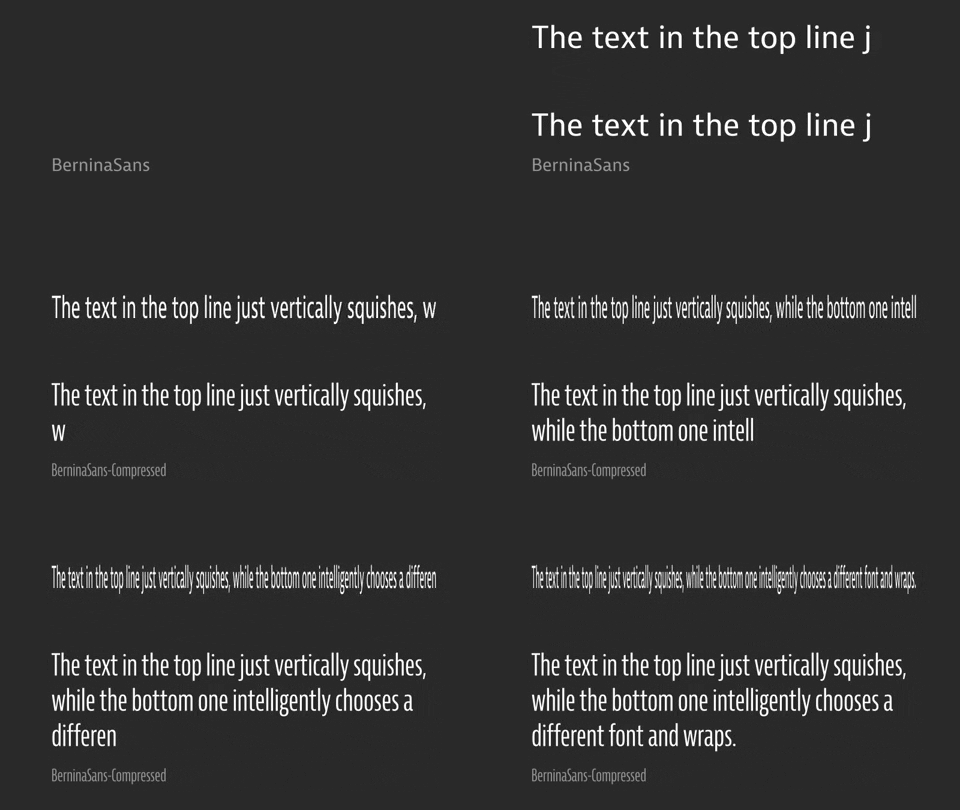
    Just replace your last line of the expression with [s,100]; and you should get the reeuslt you need.

    FYI, a quick proof of concept ☺

    using Bernini Sans Regular / Narrow / Condensed / Compressed

  • Filip Vandueren

    July 16, 2020 at 8:02 pm

    Source:


    txt=thisComp.layer(1);
    w=txt.sourceRectAtTime(time).width;

    if (w<640) {
    f = "BerninaSans";
    } else if (w<715) {
    f = "BerninaSans-Narrow";
    } else if (w<800){
    f = "BerninaSans-Condensed";
    } else {
    f = "BerninaSans-Compressed";
    }

    style = createStyle();
    style.setText(txt.text.sourceText.value + "\r" + f).setFont(f);

    Who knows, in another 10 years After effects might support variable Fonts, then another 10 before we can control them with expressions 🙂

  • Solinda Keth

    July 16, 2020 at 8:09 pm

    hahah we need more effects! Thanks so much for your help! ☺ The client better like it 😛

  • Tomas Bumbulevičius

    July 30, 2020 at 12:15 pm

    Hey Solinda, additionally to what Filip has suggested, I think adding text-tracking could be also a good way of overcoming this issue,

    Meaning – when text lenght goes beyond certain value, text tracking between characters decreases. Then – you won’t have stretched out text, nor different font families – win win!

    Find out more:
    Motion Graphics Design & After Effects Tutorials
    On YT
    On VH

We use anonymous cookies to give you the best experience we can.
Our Privacy policy | GDPR Policy