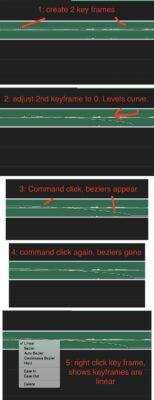
-
Audio Keyframes Automatically Curving in Premiere??
Hey all,
New to the forum here, but couldn’t find anything else about this. I’ve got a weird problem in Premiere and can’t for the life of me figure out how to fix it.
I’m using keyframes to adjust audio levels in a timeline, but when I start to move the keyframe up or down, Premiere is automatically “curving” my levels. If I command click the key frame, I get bezier handles (as I would expect). Command click again to remove the handles and the curve remains. When I right click the keyframe, it says it is linear, but it sure doesn’t look that way to me. I haven’t seen this in my 5 years of using Premiere and it’s driving me nuts.
Please let me know if you have any thoughts!