

Activity › Forums › Maxon Cinema 4D › Area lights – 1000 samples still not enough?
-
Area lights – 1000 samples still not enough?
Posted by Brian Murphy on November 19, 2024 at 9:38 pmI have always had an issue with using area lights as shapes. For example, if I set an area light to be a cylinder shape or sphere shape or even a shape based on a mesh I’ve created, the light that casts onto a surface will be spotty…fair enough, boost up the samples…better. However, it caps at 1000 samples and that’s still not enough. What do you do to get a smooth casting of light? Thank you!
Brian Murphy replied 1 year, 9 months ago 2 Members · 5 Replies -
5 Replies
-

Kouraib Abdmalek
November 20, 2024 at 12:00 pmHi Brian,
Please attach a screenshot or something else to clarify the issue because I am using it on my version and I do not notice this problem.
-

Brian Murphy
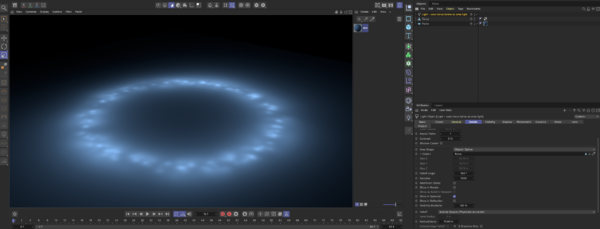
November 20, 2024 at 11:50 pmThanks. Here’s a perfect example. I’ve used the torus in this scene as an area light object, casting light onto the plane below. I’ve cranked the samples all the way up to 1000…still dotty!
This seems to happen when I need to cover large areas with shaped area lights.
-
Brian Murphy
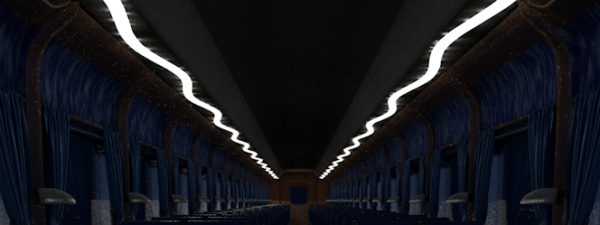
November 21, 2024 at 12:41 amAnother example. The squiggly whiter lines at the top are supposed to be lights but you can see the dots it casts out to the surface on either sides of the squiggles. Samples are cranked to 1000, scale of project is accurate to real world.
-
Kouraib Abdmalek
November 21, 2024 at 11:09 amThanks for the clarification! There are two things: the first is that Render settings have a big role in improving the light casting, adding effects like Color Correction, Global Illumination and Ambient Occlusion has a big impact on that, and the other thing is that using a luminous material and applying it to the shape you want to make it as a light source gives you better results, especially in casting light onto another surface. I tried to explain all of that in a screen recording, let me know if it works for you.
-
Brian Murphy
November 22, 2024 at 6:37 pmThis is wonderful, thank you for taking the time to make this video. I think I’ve just answered my question in watching what you’ve done here – you are using Global Illumination, I do not. I am using the built in physical renderer with just a lot of area lights, many as objects that cover large areas and that is when I get the dot artifacting. I obviously have to use GI to eliminate said artifacts. That’s a bummer as I have quick turnarounds on projects and don’t have the time to tweak and render GI. Thank you for helping me come to this helpful conclusion!
Reply to this Discussion! Login or Sign Up