-
Anxiety | AE Layer # Issue
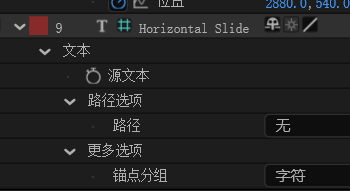
As shown in the image, why is there a # in front of the layer? I previously thought it was a plugin and didn’t pay much attention to it.
It wasn’t until today, when I was faking an engraving effect, that I realized it wasn’t the case. All the parameters in the layer were completely default text parameters, but there was a #, and the adjustment layers above it could affect its position (such as transforms, moving, bending, etc.). Since my faking didn’t have this #, any adjustment layers couldn’t use transforms to modify the text’s position.