

Activity › Forums › Adobe After Effects › Animation of particles travelling on a tube achievable without plugins?
-
Animation of particles travelling on a tube achievable without plugins?
Posted by Miguel Credito on March 17, 2021 at 3:30 pmHi everyone, I used to work on a lot of AE projects years ago but I stopped because my work doesn’t require it and now I need to work on a small project animation and a bit rusty in AE ?
I am going to do an animation of particles travelling on a tube and the camera will pan on the particles while travelling on the tube, there will be no parallax movement on the camera. My question is, is this achievable without plugins? I am thinking of using Trapcode particular but have to purchase that. Will the built in particle world work? I am not sure of the capability of the new version of AE so I am asking your expert advice. Thank you!
Matthew Woods replied 5 years, 5 months ago 4 Members · 10 Replies -
10 Replies
-

Walter Soyka
March 17, 2021 at 6:47 pmI’m sorry, I’m afraid I don’t understand the visual you’re describing. Could you show a couple of quick storyboard images?
-

Miguel Credito
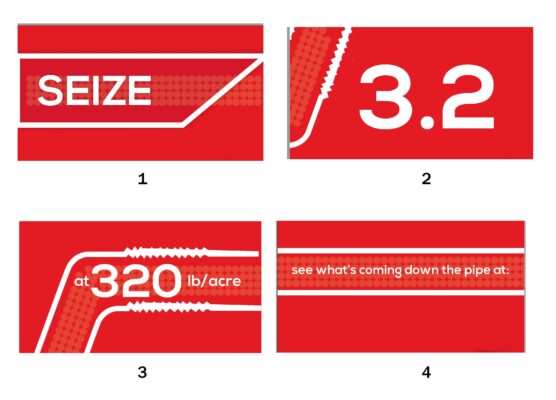
March 17, 2021 at 8:11 pmHi, sorry I wasn’t able to explain it clearly. Here’s the storyboard.
So the plan is a simple animation of particles running inside a tube and the camera follows the particles as it travels through the pipe. There is no parallax in the camera movement, it’s just panning.
The flow of the particle is continuous, is this achievable by just using AE alone without plugins? Or do I have to purchase trapcode?

-

John Cuevas
March 18, 2021 at 3:00 pmWill the particles be just small circles like in the illustrations. If so you could do that with text animators and wingdings.
-
Matthew Woods
March 18, 2021 at 7:14 pmI second the use of text animators. Apply the text to a path that follows that pipe. You can randomly offset it from that path. You can use a period or something from a hand drawn or other slightly irregular looking font, and randomize the character rotation to have them tumble as they move along. You can do a lot with text animators on a path, and they are much easier to control than particles.
-
Miguel Credito
March 18, 2021 at 7:23 pmWill this work if I want the particles to be circle or a specific shape like seeds?
-
Miguel Credito
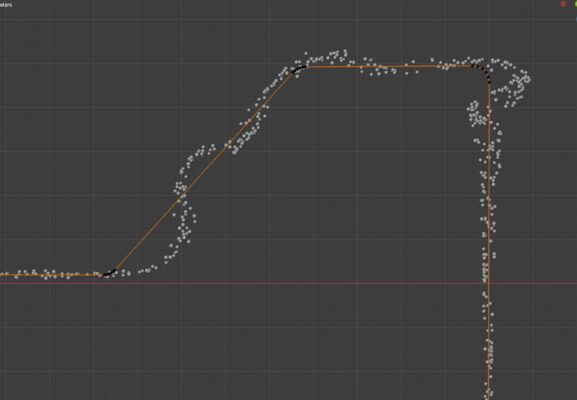
March 18, 2021 at 7:28 pmI roughly recreated the particles in Blender.. Can this be achievable when using text animators? I would have done it in Blender but I can’t control the physics well and get what I want to achieve that is why I want to use AE.
The flow of the particles should follow the path perfectly and I can’t achieve it in Blender as seen on the photo.
-
Matthew Woods
March 18, 2021 at 8:55 pmSure. Here is a quick and dirty example project that I put together. Text animators take a little getting used to, but are very powerful, and render quickly. They are one of my favorite features of AE. You can do a lot with them, from particle streams to animated arrows, to Harry Potter map style footprints.
-
Miguel Credito
March 18, 2021 at 9:49 pmWow! I think this is what I need! What’s the name of the effects involved in making these? I’m wondering if you can point me to a tutorial where I can learn these as I need to let the particles flow on a specific path. Thanks Matthew!
-
Matthew Woods
March 18, 2021 at 10:10 pmNo Effects. Just periods on a path, with some randomized character offsets created with a text animator. I added a little bit of rotation around an offset anchor to give the particles a little bit of turbulence. I also gave it a bevel layer style to make it look a little more like your blender spheres. I can’t point you to a specific tutorial, but if you google text animators you can find a few. I’ve thought about making some tutorials myself as I’ve discovered a lot of fun tricks you can do with them, but never found the time to do it. Feel free to copy that layer into your project and adjust the path, and play with the settings. Good luck.
Reply to this Discussion! Login or Sign Up