

Activity › Forums › Maxon Cinema 4D › Animating a spline
-
Animating a spline
Posted by Lasse Peterson on July 20, 2021 at 4:36 pmHi
So i’m having trouble with some very basic stuff…
How in earth do i animate a spline?I want my spline to animate/offset from 0 to 100%
as i have made a “red carpet” from a spline and a extrude object, that i want to animate in from the back.
Also for now i’ve only gotten the lite version that comes with AE.
 Jim Scott replied 5 years, 2 months ago 3 Members · 8 Replies
 -
8 Replies
-

Justin Thomson
July 20, 2021 at 5:08 pmYou will need to turn on “Point Level Animation”. You can find it to the right of the keyframe recording options. the icon is Nine dots.
-

Jim Scott
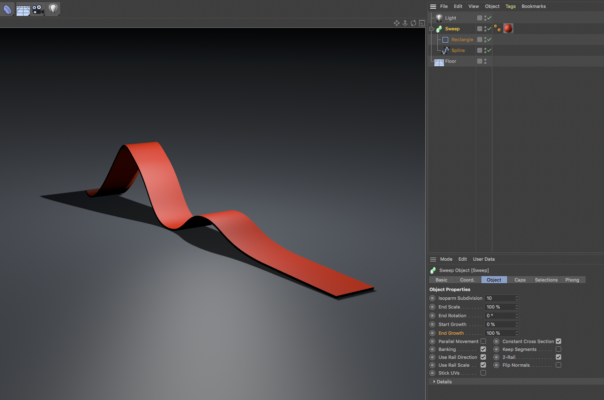
July 20, 2021 at 10:20 pmIf the image below represents what you’re after, create the carpet by sweeping a rectangle along the spline and animate the “End Growth” of the sweep.
-

Lasse Peterson
July 21, 2021 at 12:51 pm@<b style=”background-color: transparent; font-family: inherit; font-size: inherit;”>Jim Scott
Thats exactly it! Thank you so much Jim!
i have a small follow-up question.
the way i see i cant have 2 colors on the sweep extruder (i would like for the bottom to be a different colour).The other way i could just set the sides to front and back, but this somehow doesn’t work now regardless of how i try to set the projection (and tags seem to do nothing as well).
Is there a quickfix to this to, or do i have to copy/paste a copy and change the colour of the bottom one?
-
Lasse Peterson
July 21, 2021 at 12:53 pm<b style=”background-color: transparent; font-family: inherit; font-size: inherit;”>@Justin Thomson
Genius!
My only problem with this solution is that it doesn’t seem like you can make the animation “grow from the back to the front” only make it wobble and twist, but thank you none the less 🙂
-
Jim Scott
July 21, 2021 at 2:35 pm“i have a small follow-up question.
the way i see i cant have 2 colors on the sweep extruder (i would like for the bottom to be a different colour).”There are selections for sweep objects, but I think because they are used predominantly for setting different colors for the caps and bevels of text there doesn’t seem to be one which would isolate the top or bottom as you would like (at least not one I could quickly find). So, the next option would be to use a spline wrap deformer on a cube that has been given the dimensions of the carpet (see example project below). Make the cube editable so that the bottom polygons could be given a selection tag to use with a second color. Because of the way that splines are applied with the spline wrap deformer you may need to select the Axis of the deformer to -X (or whatever is applicable for your own setup) so that the selected polygons appear on the bottom of your carpet (as I did with my example). Hope this helps.
-
Lasse Peterson
July 26, 2021 at 6:40 amHi Jim
I looks perfect, but the spline wrap is not included in the Lite version, so until i get the full pack i made a copy with a small height and placed it underneath. Not as pretty as your solution but it did the trick. Thank you so much for all the help 🙂
-
Jim Scott
July 26, 2021 at 2:36 pmI forgot that you were using C4D Lite. I don’t have that so I don’t know what it’s missing. Glad you got it worked out.
Reply to this Discussion! Login or Sign Up