Creative Communities of the World Forums

The peer to peer support community for media production professionals.

Activity Forums Adobe After Effects All audio boxes are greyed out in timeline and won’t play unless I solo one or all layers

  • All audio boxes are greyed out in timeline and won’t play unless I solo one or all layers

    Posted by Phillip Beers on December 22, 2010 at 7:40 pm

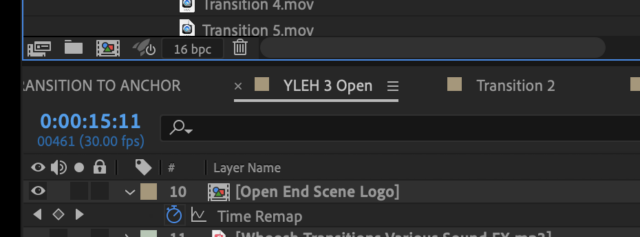
    All the audio boxes in my timeline are greyed out. I’m not sure if I hit a shortcut key on accident or what but I can only get the audio to play back if I solo the layers. Please help. Thank you

    Ellen Yarbrough replied 2 years ago 3 Members · 3 Replies
  • 3 Replies
  • Daniel Czon

    October 24, 2014 at 2:23 am

    Did you find a solution to this problem? I’ve got the same thing happening to me!

  • Daniel Czon

    October 24, 2014 at 4:04 am

    Ok! I sorted it out by saving the project, restarting AE and reopening the project. Just an annoying bug…

  • Ellen Yarbrough

    August 8, 2024 at 5:59 pm

    On the timeline just above the layers is a little white dot which solos a layer. Check to see if one of your layers has that selected. I accidentally hit the solo button on a sound layer and it was the only one that would have sound.

We use anonymous cookies to give you the best experience we can.
Our Privacy policy | GDPR Policy