

Activity › Forums › Adobe After Effects › After Effects Project Downgrader
-
After Effects Project Downgrader
Posted by Darren Lee on January 7, 2019 at 10:03 amHi, I often use this excellent Premiere Project Downgrader for when i don’t have access to latest versions : https://www.joshcluderay.com/downgrade-premiere-project-converter/
Is there anything similar for After Effects?
I’m using OSX 10.11 on a Mac. AE 2019 is for 10.12 onwards, so I want to downsave the file without having to upgrade my entire system!
Thanks
Liam Cockcroft replied 2 years, 10 months ago 6 Members · 9 Replies -
9 Replies
-

Walter Soyka
January 7, 2019 at 2:54 pmSorry, Darren, I’m not aware of any tool that does this for Ae. The AEP project file format is very different than the PRPROJ file format, and I don’t think there’s a clean way to do what the downgrader does.
If you have a one-off AEP that you need saved down a version or two, I’d be happy to help out.
Walter Soyka
Designer & Mad Scientist at Keen Live [link]
Motion Graphics, Widescreen Events, Presentation Design, and Consulting
@keenlive | RenderBreak [blog] | Profile [LinkedIn] -

Mark Whitney
January 7, 2019 at 6:39 pmThat’s a slick Premiere site that I never new existed.
You might be interested in this:
On aescripts:https://aescripts.com/pt_opensesame/
It’s sole purpose is to exchange AE projects between versions & OS’s.
The trial version allows full export; to import requires the license. But, what it exports is a simple, csv text file that you can subsequently open & at least see if has your asset paths, etc. Pretty sure it’ll do what your wishing though.
-

Darren Lee
January 8, 2019 at 9:18 amThanks Walter, I eventually installed a VirtualBox of Sierra to open it, which was not ideal
-
Darren Lee
January 8, 2019 at 9:26 amThis is interesting, I don’t think I’d pay the $70 though. Shame they don’t allow importing in the trial.
Much appreciated.
-
Walter Soyka
January 8, 2019 at 11:29 ampt_OpenSesame was THE way to handle downsaves before Ae added the feature natively (sometime around CS6 IIRC). It’s also still a great way to make all kinds of project changes with a spreadsheet.
Unfortunately, I don’t think it would help too much here, as you’d still have to have the newer version in order to open the original AEP.
Walter Soyka
Designer & Mad Scientist at Keen Live [link]
Motion Graphics, Widescreen Events, Presentation Design, and Consulting
@keenlive | RenderBreak [blog] | Profile [LinkedIn] -
Mark Whitney
January 9, 2019 at 12:54 am[Walter Soyka] ”
Unfortunately, I don’t think it would help too much here, as you’d still have to have the newer version in order to open the original AEP.”Ya, that’s always the catch. Couldn’t quite tell from the original post if that was the case or not.
-

Alicia Medina
September 16, 2020 at 4:45 pmI write this in case it works for someone else:
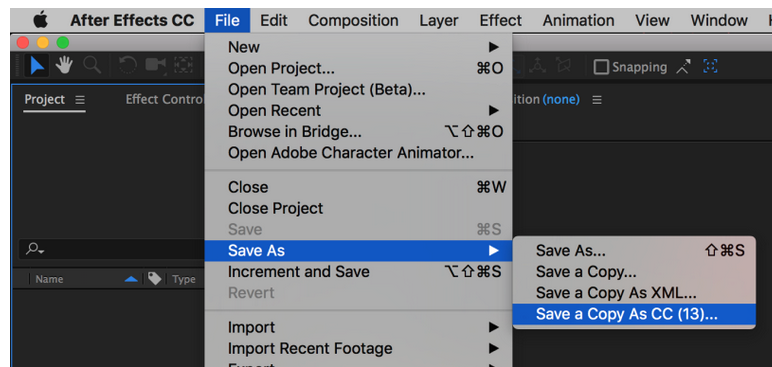
now that you can open the project with the VirtualBox installed, you can save it as seen in the attached screenshot and you could go back to your “normal” version, (without the VirtualBox) and open the project.
-

Michael Szalapski
September 17, 2020 at 1:39 amThis is why I keep a machine with old versions installed on it – just in case I need to walk a project back for some reason or other.
Although, I don’t really know why I would need to do that anymore…
-

Liam Cockcroft
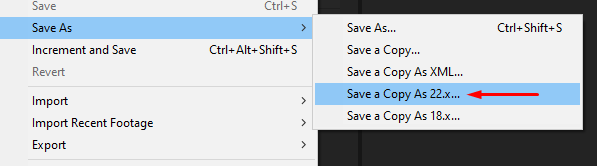
October 24, 2023 at 3:04 pmHi Darren, you can save a project for previous versions by opening that project in its current version and saving as… see screenshot.

Reply to this Discussion! Login or Sign Up