

Activity › Forums › Adobe After Effects › After Effects Mask Feather wont feather, just expands a hard edge.. how do I correct?
-
After Effects Mask Feather wont feather, just expands a hard edge.. how do I correct?
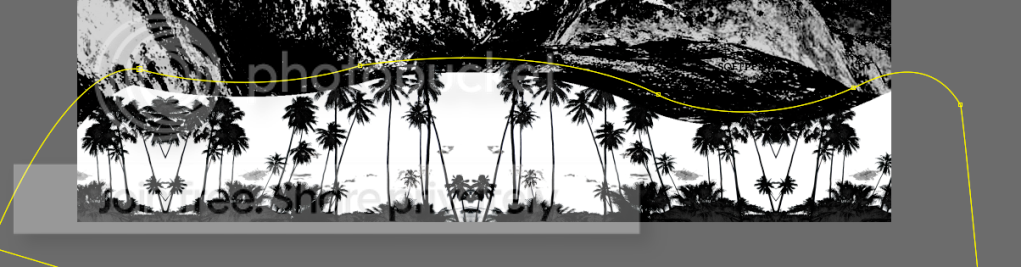
Posted by Kurt Hudson on January 4, 2010 at 9:08 pmFor some reason the last few times I tried to feather the edges on a mask in after effects it expands the hard edge instead of feathering the edge… sort of like a matte choker or simple choker… did I mess something up in my settings or is there something im doing wrong?
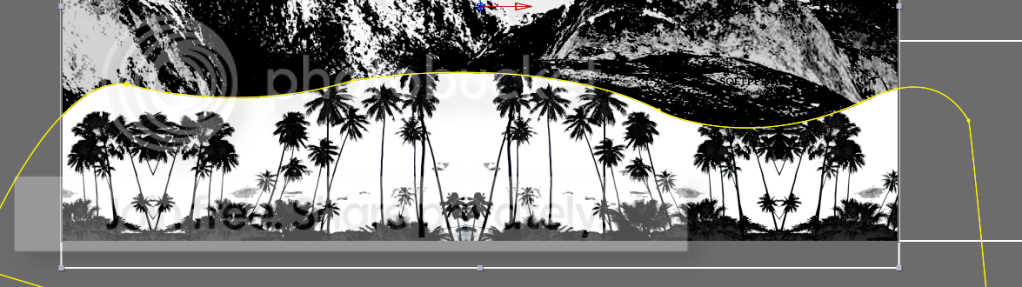
Here it is before applying feathered edge
and here is the feathered edge at 25
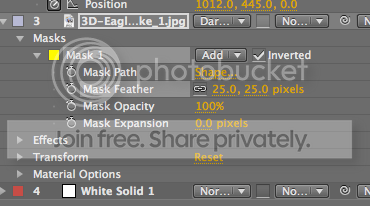
And my mask settings….
If you can help me then you are awesome!!! THANKS!
Kurt Hudson replied 16 years, 9 months ago 4 Members · 13 Replies -
13 Replies


-

Kurt Hudson
January 4, 2010 at 9:19 pmI have colorama and motion tile applied to the layer that im trying to feather the mask on. the composite/transfer mode is on darken as well.. but this problem has happened before on footage that was just keyed out with keylight, i would try to soften the edges of the mask and it would just give me a wicked hard edge…
-

Steve Roberts
January 4, 2010 at 9:43 pmHmm … the Darken mode may be the problem. The feather will create shades of gray, and the underlying image is mostly black. Might changing the mode help?
-
Kurt Hudson
January 4, 2010 at 10:00 pmWelll… removing the darken didnt help, it still did the same thing
Also…
I tried using the solid as a track matte and couldnt get it to work.. so instead I put 2 white solids and feathered the edges on them creating this

It looks the way I wanted but will not work for the way I planned on animating my comp… any other suggestions? Does anyone know why it wont feather?
-

Michael Szalapski
January 4, 2010 at 10:11 pmColorama effects alpha. Try using some other form of coloring.
– The Great Szalam
(The ‘Great’ stands for ‘Not So Great, in fact, Extremely Humble’)No trees were harmed in the creation of this message, but several thousand electrons were mildly inconvenienced.
-

Maurice Jansen
January 4, 2010 at 10:12 pmi guess to simple from me!
try to precompose the layer you want to mask
grt
MauricePeople saying they don’t make mistake’s often make nothing at all!
-
Kurt Hudson
January 4, 2010 at 10:23 pmMichael Szalapski is the winner of the awesome award! I tried precomposing that didnt work… so I changed colorama to threshold which worked for this particular project but is going to suck on my future projects… why is it that colorama effects alpha like that? Thanks eveyone for your help!
-
Steve Roberts
January 4, 2010 at 11:30 pmYou can also switch off “Modify Alpha” in the Colorama controls, no?

Reply to this Discussion! Login or Sign Up