

Activity › Forums › Adobe After Effects › After Effects CS4 Render Failed
-

Kevin Camp
September 25, 2009 at 8:04 pmi’m sure you found it, but here’s the link:
i like streamclip for 3 reasons: easy, multi-platform, free. it could be better if it could create mpeg-2 in other formats like .mpg, .m2v and .mts. right now i can only create them as .mov.
fyi, media encoder does offer many mpeg-2 options, but i don’t have a pc version of cs4 for a pc that i use for things other than ae.
Kevin Camp
Senior Designer
KCPQ, KMYQ & KRCW -

Jeremy Fabiano
September 25, 2009 at 8:07 pmcool just downloaded, yeah I’m going to download the demo of media encoder (if there is one, i haven’t looked) and see if it’s worth w/e cost adobe’s gonna want for it..
-Jeremy
————————————————-
If you didn’t supply enough information I will start making assumptions. I’m usually wrong when I assume.
————————————————- -
Kevin Camp
September 25, 2009 at 8:38 pmi don’t think you can get just media encoder… (i was looking for it too)
adobe seems to treat it much the way apple treats compressor, it’s just a tool for premiere/ae so it only seems to come with the the cs4 versions of either of those or the production suite.
within the next few months, i’m going to need to find a smooth workflow to create a specific mpeg-2 for a new hd broadcast device that we are getting, and i’ll need to do it from this one pc… but first i need them to set up the hd device, so i can start testing files/workflow.
if anyone happens to know of a utility that will take avi/mov and create an hd mpeg-2 that can be ready by a miranda vertigo system, i’d like to hear about it (not sure if it is .mpg, .m2v, .ts, .mts, etc.). once our vertigos are set up, i’ll be asking in the compression forum.
Kevin Camp
Senior Designer
KCPQ, KMYQ & KRCW -
Jeremy Fabiano
September 25, 2009 at 8:43 pmheh.. figures CS4 only -.-
heck I’m still using my friends’ copy of CS3 while he’s in the airforce…
Hoping to get a freelance job or two and get cs4 master..
-Jeremy
————————————————-
If you didn’t supply enough information I will start making assumptions. I’m usually wrong when I assume.
————————————————- -
Jeremy Fabiano
September 25, 2009 at 8:51 pmhahaha AMD basher huh? No worries, Intel Core2Duo 1.8ghz (not over clocked), 2 gigs dual channel ram, nvidia 8600GT-S OC (not overclocked)
I have ONE amd box around, dual 2.8ghz, no ram. It’s still sitting in the 5U rack box on my workbench LOL Just haven’t had the time to find the right ram, not sure what I’m going to use it for. I’m considering adding it into my makeshift render farm for the time being.
My next computer will be a dual quadcore with as much ram as i can stuff into it..
Oh speaking of memory.. something a friend showed me https://www.microsoft.com/whdc/system/platform/server/PAE/PAEdrv.mspx – Physical Address Extension. Let’s windows address a little bit more ram!
Haven’t done any research on it yet, but I plan to.
-Jeremy
————————————————-
If you didn’t supply enough information I will start making assumptions. I’m usually wrong when I assume.
————————————————- -

Allan h.b. Martin
September 29, 2009 at 2:22 pmSET TO THESE SETTINGS FOR THE BEST RENDER!!
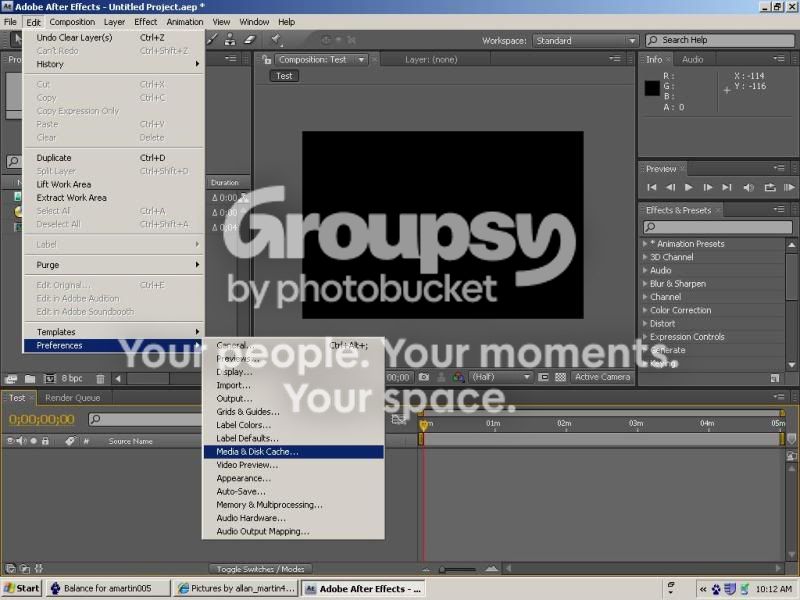
Then
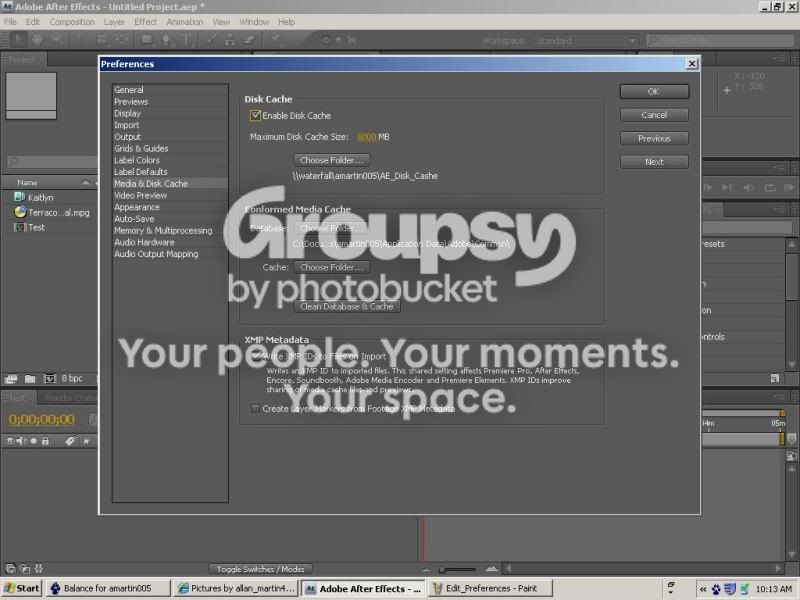
Then

If you are also having problems with the Open GL Preview, turn it off here.
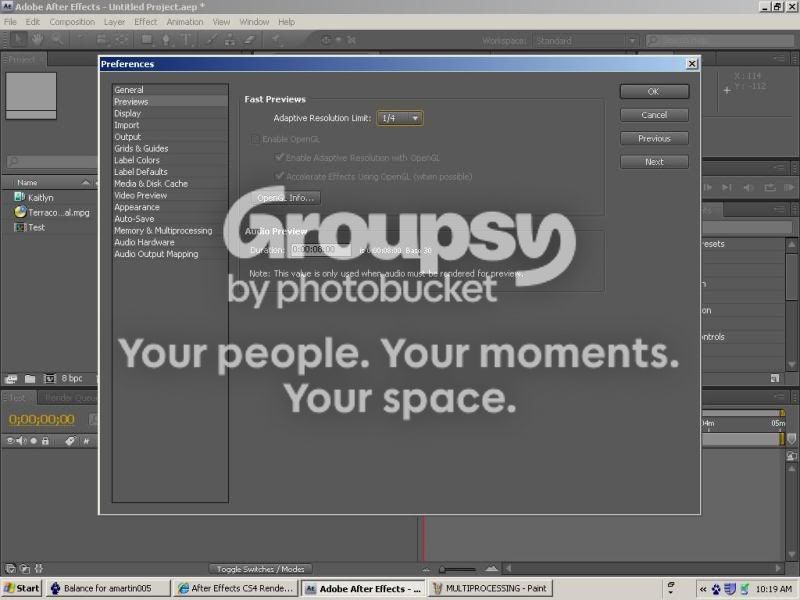
Hope this helped. Let me know! allan@yourdreamscape.com
-

Kevin Van
September 29, 2009 at 7:05 pmI found that using Adobe Encoder a lot better but thanks I’ll try soon


Reply to this Discussion! Login or Sign Up