Creative Communities of the World Forums

The peer to peer support community for media production professionals.

Activity Forums Adobe After Effects After Effect is tinting my footage

  • After Effect is tinting my footage

    Posted by Anthony Sneed on April 2, 2023 at 1:15 am

    This is very strange.

    If I export a file from After Effects and bring it back in, I’ve noticed the way it handles color, it’ll shift tints ever so slightly on random frames.

    I noticed some of my clips would have a slight, faint, very infrequent strobing of tint because of this.

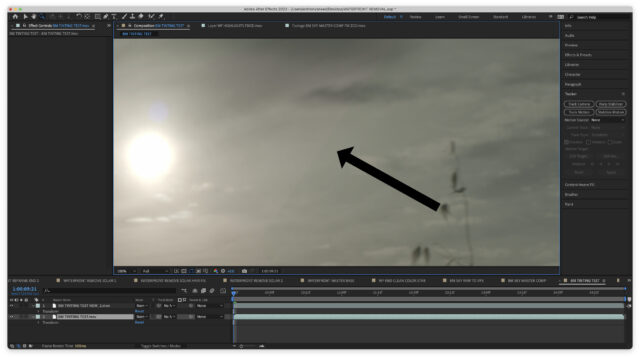
    I’ve attached a photo of a clip that I exported, brought it back in with the original, then threw a mask on it so you can see the difference.

    I’m wondering if this has to do with my projects being set at 16 bpc instead of 8 bpc?

    My colorspace is set to none.

    When I export to ProRes 4444 the depth is millions of colors and it’s set to premultiplied (matted)

    Here’s a link to the first piece of footage I noticed it affecting. You’ll have to zoom in and you can see it tint green and magenta at times. It’s very subtle but noticeable.

    https://drive.google.com/file/d/1sT5-06tIM5ouiarUImK_zUTar96b0Bly/view?usp=sharing

    My specs:

    MacBook Pro

    16-inch, 2021

    Chip Apple M1 Max

    Memory 64 GB

    macOS Ventura 13.2.1

    After Effects 23.2.1

    Anthony Sneed replied 3 years, 1 month ago 2 Members · 2 Replies
  • 2 Replies
  • Usama Aslam

    April 2, 2023 at 1:17 pm

    This could be due to a number of factors, including color space mismatch, bit depth, or codec issues.

    Since you mentioned that your project is set to 16 bpc and your colorspace is set to none, it’s possible that this could be contributing to the issue. You might try changing your project settings to 8 bpc and sRGB color space to see if that helps.

    Additionally, you could try exporting to a different codec or using a color management workflow to ensure consistent color throughout your workflow.

    It’s also worth noting that color shift issues can sometimes be caused by hardware or driver issues, so it may be worth checking for any updates or troubleshooting your hardware if the issue persists

  • Anthony Sneed

    April 3, 2023 at 4:46 pm

    Thank you for this response.

    What’s a color management workflow? I’ve never heard of it.

    I’ve made all the changes you mentioned, hopefully they work!

We use anonymous cookies to give you the best experience we can.
Our Privacy policy | GDPR Policy