Creative Communities of the World Forums

The peer to peer support community for media production professionals.

Activity Forums Adobe After Effects AE|Trimming path problem

  • AE|Trimming path problem

    Posted by luke di on September 30, 2025 at 5:02 am

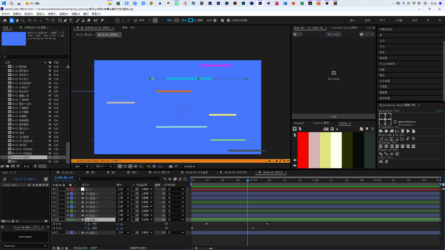
    As shown in the image, we know:

    a. The line’s anchor point is on the left, which is fine.

    b. The line has start and end keyframes, which is fine.

    c. The line’s start and end points are both at 100%, which is fine.

    d. The line bounces around 60%, which is a problem.

    e. There is no scaling transformation.

    f. I expected it to disappear from left to right, and the other lines did (except for three), which is fine.

    Can someone please explain˃̣̣̥᷄⌓˂̣̣̥᷅:

    Why does the bounce problem occur?
    luke di replied 7 months, 1 week ago 2 Members · 5 Replies
  • 5 Replies
  • John Martin

    September 30, 2025 at 11:47 am

    Hey Luke, no panic, it’s time to solve this. But, please can you provide a screen recording of the issue? Unfortunately, just with text and a still image, the issue remains ambiguous, please, provide a video.

  • luke di

    October 5, 2025 at 4:02 am

    Yes, as shown in the video, there’s a bounce in the middle.

    When there’s no start keyframe, only an end keyframe, it grows normally.

    For most other lines, they disappear normally from left to right, without triggering a bounce.

  • John Martin

    October 5, 2025 at 6:28 am

    Luke, i know you will hate me,

    but can you please record the video with these 2 requirements?

    -1 set the language of AE to English.

    -2 Show the other lines that work correctly and how you achieved those.

    Thank you.

  • luke di

    October 6, 2025 at 1:54 pm

    Haha, I don’t hate you that much.

    I’m pretty sure this isn’t a language issue.

    The problem probably lies with the lines. I’ll look into it later when I have time, find the cause, and then post a reply to this thread to avoid confusion for future generations.

    Thanks for your reply.

  • luke di

    October 10, 2025 at 1:13 pm

    I think I’ve found the cause. It’s probably due to copying the trimming path. I created an equivalent line with nearly identical parameters, and the new one didn’t have the bounce issue.

    So it’s probably due to copying the trimming path (possibly).

We use anonymous cookies to give you the best experience we can.
Our Privacy policy | GDPR Policy