Creative Communities of the World Forums

The peer to peer support community for media production professionals.

Activity Forums Adobe After Effects AE Lighting without shadow issues

Tagged: 

  • AE Lighting without shadow issues

    Posted by luke di on September 21, 2025 at 5:45 pm

    I need to make three-dimensional text appear with a shadow (both the white background and the text layer have Drop Shadow and Drop Shadow enabled).

    However, no matter how I move the point light, the text doesn’t cast a shadow (as shown in the picture, I changed the shadow to red, but it obviously doesn’t appear at all. I also tried moving the point light closer to the ground, but that still doesn’t work).

    My layer has an additional ambient light, and I tried deleting that layer, but that still doesn’t work.

    I’d like to know why the shadow isn’t appearing. Thank you.
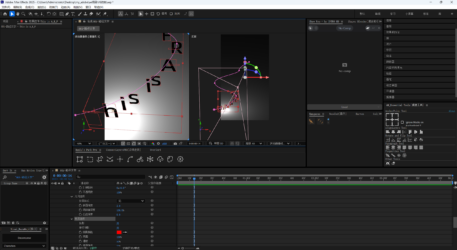
    luke di replied 7 months, 2 weeks ago 4 Members · 5 Replies
  • 5 Replies
  • John Martin

    September 21, 2025 at 6:39 pm

    shift-parent the light to the text, then use a null to offset the light slowly, you should see the shadows, if not, lemme know and i tell you option B.

  • Graham Quince

    September 22, 2025 at 8:15 am

    Another cause of this might be the renderer you’re using. Classic 3D lights can cast shadows, but unless you’re using the latest beta, parallel and spot lights cannot cast shadows for Advanced 3D.

  • luke di

    September 22, 2025 at 8:57 am

    I tried linking the light to an empty object and moving it, but it still didn’t work.

    My projection and receive projection were both enabled (as described in the video).

  • Greg Gesch

    September 22, 2025 at 11:59 pm

    IF you are saying that you enabled Layer Styles when you wrote, “(both the white background and the text layer have Drop Shadow and Drop Shadow enabled).” then this may be your problem.

  • luke di

    September 23, 2025 at 10:28 am

    Yes, it was a renderer issue. I tried Classic 3D and turned on the projection in the lighting settings, which solved the problem (when I first created the composition, I used Advanced 3D Rendering, which caused my projection to be turned off). Thank you for your answer.

We use anonymous cookies to give you the best experience we can.
Our Privacy policy | GDPR Policy