Creative Communities of the World Forums

The peer to peer support community for media production professionals.

Activity Forums Adobe After Effects AE CS4 RAM Preview Issues

  • AE CS4 RAM Preview Issues

    Posted by Michael Zoppo on December 14, 2008 at 11:47 pm

    Hello all,

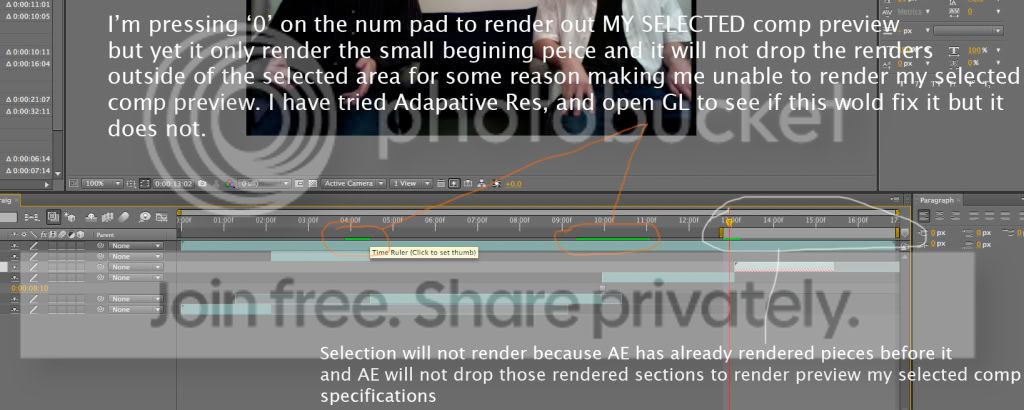
    I’m having issues preview my selections in CS4. I will select certain parts of my comp to preview to see what they look like and then i’ll move the selection down the timeline some to preview other parts, but AE will not drop the rendered previews from before and will barely render out anything in my current selection. Here is a screenshot so you’ll see what I mean.
    Photobucket

    Gary Parkin replied 15 years, 2 months ago 5 Members · 5 Replies
  • 5 Replies
  • Jan Sherlink

    December 15, 2008 at 12:14 pm

    seems weird,
    maybe check your cache settings,
    or reset all AE’s preferences by starting AE while holding CTRL+SHIFT+ALT,
    that fixes quite a lot of things 😉

    cya,

    Jan

  • Kevin Camp

    December 15, 2008 at 12:56 pm

    if resetting the prefs doesn’t help, try choosing edit>purge>all to force ae to clear all caches… it’s not really a fix, but more of a workaround, since ae should auatomatically clear cached frames to make room new frames.

    if you are consistently seeing this problem, post in adobe’s ae forum, maybe they’ll address this in an ae9.0.1 update…. include your machine specs, cache settings and os version.

    Kevin Camp
    Senior Designer
    KCPQ, KMYQ & KRCW

  • Gary Parkin

    February 12, 2011 at 9:32 pm

    Did that help?
    Mine’s doing the same thing but I think it’s because AE crashed and I had to restart it.

    Sooner or later I am going to get this down…

  • Robert Hoisan

    February 13, 2011 at 2:02 pm

    Hello!

    Try and disable the “From current time” option in the preview panel. Maybe it is enabled for some reason.

    Robert Hoisan
    Motion Graphics Artist

  • Gary Parkin

    February 13, 2011 at 5:09 pm

    Yes it was. I enabled it.
    Thanks

    Sooner or later I am going to get this down…

We use anonymous cookies to give you the best experience we can.
Our Privacy policy | GDPR Policy