Creative Communities of the World Forums

The peer to peer support community for media production professionals.

Activity Forums Adobe After Effects Expressions Adding Sliders to Scale

  • Adding Sliders to Scale

    Posted by Catrina Delos reyes on February 6, 2021 at 4:35 pm

    Hi! I’m new to using expressions and I’m not sure on how to go about this. I wanted to make a mogrt so I started studying about it.

    I’d like to make a slider for the scale property. One for the horizontal scale, and one for the vertical one. I don’t want it to scale uniformly because it’s going to depend on the texts that’s going to be written in the shape.

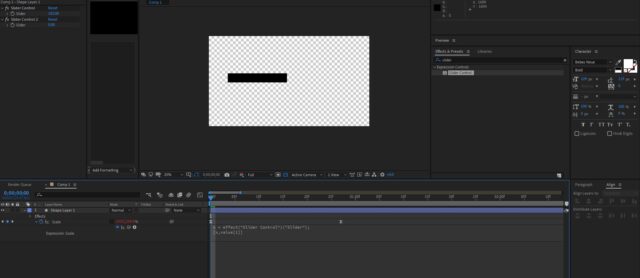
    Here’s a photo for reference. I found the expression written in a youtube tutorial but I can’t seem to tweak it to do what I want.

    I tried adding another Slider Control and renamed the value to “y”, “Slider Control 2”, then value “0” or “2” but, it doesn’t really work.

    If there’s any place where I could learn more about, please let me know. Thank you very much!

    Catrina Delos reyes replied 5 years, 3 months ago 2 Members · 4 Replies
  • 4 Replies
  • Dan Ebberts

    February 6, 2021 at 5:12 pm

    I think this does what you want:

    x = effect("Slider Control")("Slider");

    y = effect("Slider Control 2")("Slider");

    [x,y]

  • Catrina Delos reyes

    February 7, 2021 at 2:41 am

    Ohh. It works!!! Thank you very much. I’m just wondering how to read the expressions?

    The first one that I did was:

    x = effect(“Slider Control”)(“Slider”);

    [x,value[1]]

    I get the first line, but the second one, not really. What is x,value[1] for?

    and in your expression, you only put [x,y].
    I’m just wondering why is that? I want to be able to write expressions too. Hahaha.

    The expression works, now I just need to figure out how to keep the animation since it doesn’t animate anymore when I add expressions.

    Thank you again!

  • Dan Ebberts

    February 7, 2021 at 11:21 pm

    For any expression, value refers to the pre-expression, or keyframed value of the property. If the property has multiple dimensions, like scale or position, value is an array. So for scale, value[0] refers to the x value and value[1] refers to the y value. If you wanted the sliders to modify your keyframed value, you could do something like this:

    x = effect("Slider Control")("Slider");

    y = effect("Slider Control 2")("Slider");

    [value[0]*x/100,value[1]*y/100]

  • Catrina Delos reyes

    February 8, 2021 at 11:52 am

    Thank you very much!! You’re awesome!

We use anonymous cookies to give you the best experience we can.
Our Privacy policy | GDPR Policy