Creative Communities of the World Forums

The peer to peer support community for media production professionals.

Activity Forums Storage & Archiving Active Storage ActiveRAID super slow writes

  • Active Storage ActiveRAID super slow writes

    Posted by Matt Riley on March 13, 2026 at 4:12 pm

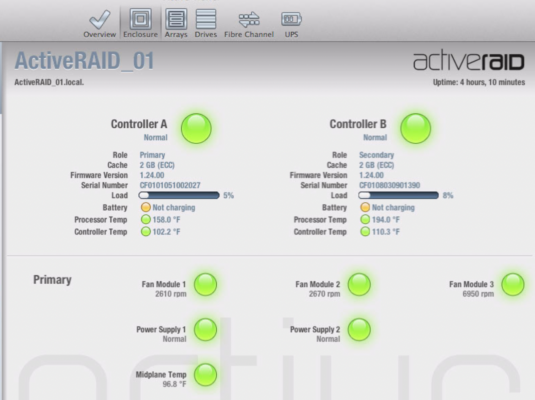
    Trying to resurrect an old Active Storage ActiveRAID AC16SFC02. I have everything working, green lights across the board, including the 16 drives (2 TB, SATA II). I have it directly attached to a Mac Pro with a 4-port fibre card (4 gb connections) and the drive mounts fine. However, write performance is absolutely horrible no matter the RAID config. On a single controller, I get like 17 MB/sec when testing, but around 650 MB/sec read.

    I’ve tried two different fibre cards (LSI and ATTO) and two different Macs with different OS versions and that didn’t make a difference. Waiting forever for it to initialize a new array doesn’t seem to impact performance to the point of such low writes. I’d like to try updating the firmware of the RAID unit but Active Storage seems to be out of business (again). Would anyone have the firmware files and utility referenced on this page? ActiveRAID firmware update

    I was able to get newer versions of their apps from a reddit post so I’m hoping maybe someone has archived more of their old downloads.

    Thanks!

    PS–For anyone who has read this far, I’ve tried setting up the arrays as:

    • One RAID 6 volume
    • Two RAID 5 volumes (software striped on Mac)
    • Two RAID 6 volumes (software striped on Mac)
    • Four RAID 5 volumes (software striped on Mac)

    They all had the same awful write performance so I don’t know how else to config it. This unit used to be part of a larger SAN installation and there is no way it performed that badly when it was new or we would have noticed! Would being dormant for about a decade have really caused performance degradation in the drives like that?

    Matt Riley replied 1 month, 2 weeks ago 1 Member · 1 Reply
  • 1 Reply
  • Matt Riley

    March 17, 2026 at 4:20 pm

    After a hint from posting on Reddit as well… It was… The controller batteries!

    The batteries displayed a status of “not charging” so I figured they were shot because they are so old. No big deal, I thought. It knows about the status so it should ignore them or whatever. But, after reading a reply on Reddit, I decided to dig into the cli tool some more and saw it had commands to disable the controller batteries manually. I did so, pressed through the warning and rebooted the RAID and now my writes are 415 MB/sec, which is much closer to what I would expect for a RAID 5 setup (two arrays as R5 on the unit, striped together in macOS Disk Utility).

    I’m not going to set the world on fire with new performance benchmarks or anything but at least this makes the unit viable for doing some useful things on a short-term project where I need the storage space.

    PS – I did pull one of the drives and put it into a USB dock to test it. The drive did 113 MB/sec RW, which is about what I was expecting from this class of drive. Another clue that the drives weren’t the issue.

    PSS – Disable battery command (batteries on both controllers): activeadmin -d <raid.ip> battery disable

We use anonymous cookies to give you the best experience we can.
Our Privacy policy | GDPR Policy