Creative Communities of the World Forums

The peer to peer support community for media production professionals.

Activity Forums Adobe Premiere Pro AAF Export weirdness

  • AAF Export weirdness

    Posted by Malcolm Desoto on October 10, 2025 at 12:18 am

    Hi, I’m trying to export a 25 minute AAF sequence. If I export a small excerpt of the timeline, all of the audio tracks are included.

    If I try to export the full sequence with the exact same settings, it will exclude the top 4 tracks…

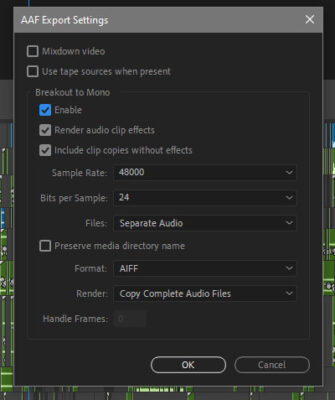
    Settings:

    Enable Breakout to Mono

    Render Audio Clip Effects

    Include copies without effects

    Sample Rate: 48000

    24 bits

    Separate Audio

    Format: AIFF

    Copy Completed Audio Files

    There are no video tracks in the sequence.

    I’ve tried simplifying the sequence and removing effects. Any ideas?

    Mads Nybo jørgensen
    replied 7 months ago
    3 Members · 4 Replies
  • 4 Replies
  • Devrim Akteke

    October 10, 2025 at 12:04 pm

    Hi,

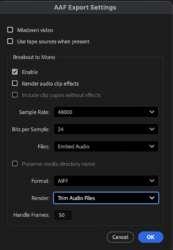
    I don’t know if this is the reason, but I never click the two options under Enable. Render audio and include clip…

    I don’t think these 2 options are necessary for audio work. You may try deselecting those two and see if it helps.

    And maybe instead of collecting all the audio, you may choose to trim audio files with a 50-frame handle.

  • Malcolm Desoto

    October 10, 2025 at 4:18 pm

    Thanks, Devrim, I tried that but same result. Just random exclusions, missing audio. Worst part is there is no error telling me what’s missing. The log report generated doesn’t say anything about excluded clips or missing audio. Even if Premiere did export a seemingly workable AAF, I would have to painstakingly comb through the file to make sure nothing was excluded being that I can’t trust the export. Unfortunately Premiere is just not a professional editing application anymore.

  • Devrim Akteke

    October 11, 2025 at 3:54 am

    Does OMF work for you? We try exporting OMF when we have problems with AAF.

  • Mads Nybo jørgensen

    October 13, 2025 at 11:07 pm

    Hey Malcolm,

    What version of Premiere Pro are you using?
    What happens if you export one track at a time?

    Reason for asking, is that I recently had a v25 project where 1 audio track was corrupted in the project. (And, yes, I did all the usual stuff to fix project/Sequence, but Adobe v25 is a pile of junk for anything longer than 5 minuttes…)

    In the end I was able to export all of it in smaller chunks. This was for Wav Stem files, which was my delivery format for that project.

    Atb
    Mads

We use anonymous cookies to give you the best experience we can.
Our Privacy policy | GDPR Policy