Creative Communities of the World Forums

The peer to peer support community for media production professionals.

Activity Forums Adobe After Effects 8-bit Brand Colors in a 32-bit Project

  • 8-bit Brand Colors in a 32-bit Project

    Posted by Henrique Bispo on June 28, 2022 at 9:18 am

    Hi,

    I’m having an issue matching RGB brand colors in a 32-bit project.

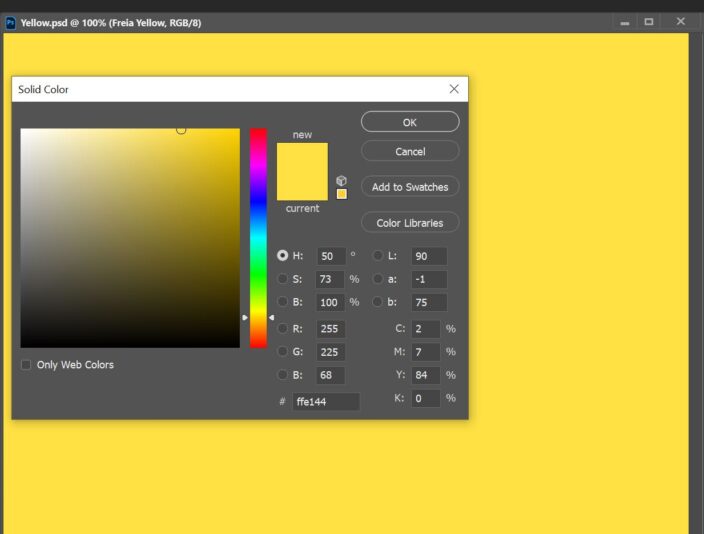
    When I color pick the colors in an 8-bit Photoshop file I get the result on the first image.

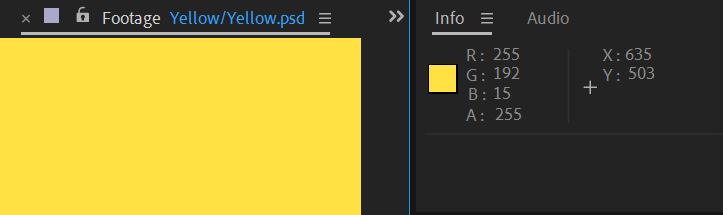
    But when I import the file into a 32-bit After Effects project, the color picker gives a totally different color reading. The second image shows this.

    I need the AE project in 32-bit because it involves a lot of keying and other 32-bit effects.

    Is there a solution to make the colors match?

    Thanks!

    Walter Soyka replied 4 years, 1 month ago 2 Members · 1 Reply
  • 1 Reply
  • Walter Soyka

    June 28, 2022 at 4:30 pm

    What is your project’s working color space?

    Look in Project Settings > Color.

    RGB brand colors usually assume sRGB, but if you’re working in a different color space (like Rec. 709 for example), the RGB numbers that represent the same color will be different.

We use anonymous cookies to give you the best experience we can.
Our Privacy policy | GDPR Policy