Creative Communities of the World Forums

The peer to peer support community for media production professionals.

Activity Forums Adobe After Effects 3D Layer Issue

  • 3D Layer Issue

    Posted by Scott Vezina on December 8, 2020 at 3:30 pm

    I looked through the archives for a similar question/answer and found nothing for this.

    AE 17.5.1

    iMac Mojave 10.14.6

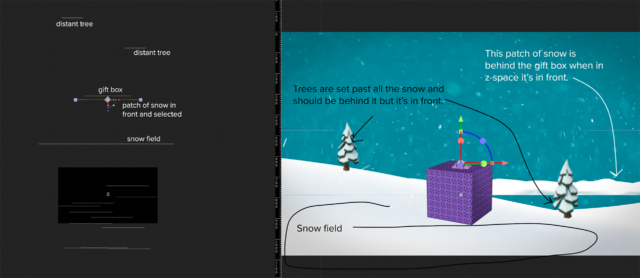
    I’m making a very simple camera move that just moves ahead and has several objects at different z-spaces. However a couple of elements are not in the correct z space (see example) they should be either in front of certain objects or behind and I cannot figure out why it wont.

    I am using png’s, psds and illustrator assets. I have never had this issue before…any help would be appreciated.

    Scott Vezina replied 5 years, 5 months ago 2 Members · 3 Replies
  • 3 Replies
  • Scott Vezina

    December 8, 2020 at 3:32 pm

    Looks like the image didn’t go through –

  • Terry Coolidge

    December 8, 2020 at 3:42 pm

    Do you have any 2D layers in between your 3D layers in your timeline? That can affect draw order. To be safe, have your layer order in the timeline be consistent with what you’re trying to achieve in 3D space, and don’t have any 2D layers mixed within your “stack” of 3D layers.

  • Scott Vezina

    December 8, 2020 at 4:02 pm

    I’ll try that now Terry.

    Thank you!

We use anonymous cookies to give you the best experience we can.
Our Privacy policy | GDPR Policy