Creative Communities of the World Forums

The peer to peer support community for media production professionals.

Activity Forums Adobe After Effects 3D Carousel, moving in 3D Space

  • 3D Carousel, moving in 3D Space

    Posted by John Richter on February 12, 2021 at 10:38 pm

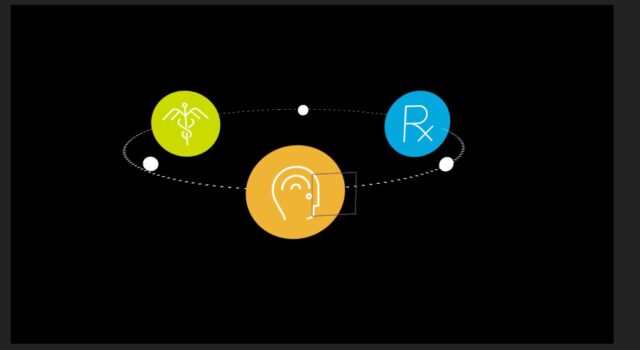
    Hello! I am needing to create a 3D carousel orbiting around the phone in this shot. I initially constructed the carousel with a 3D shape layer for the dotted circle, then just used position/scale/blur keyframes for the orbiting icons, but the shot makes this tricky. As you will see in the footage (link below), the camera arcs around the hand, which is slightly shaking as the man texts. I was able to pass it off to the client for approval on the mockup in order to secure the job, but with the upcoming build I’m wanting to polish the build, and I don’t think what I have done before will pass muster in the final.

    I watched the 3D Carousel Rig tutorial yesterday from School of Motion, which was great except it didn’t resolve the issue of actually moving the 3D carousel around in 3D space with rotations and position movement.

    Anyone have any experience with animations like this, and/or have any advice to give?

    Stock footage: https://www.gettyimages.com/detail/video/the-time-to-connect-is-now-stock-footage/1206985604


    Terry Coolidge replied 5 years, 2 months ago 4 Members · 5 Replies
  • 5 Replies
  • Terry Coolidge

    February 12, 2021 at 10:56 pm

    I’ve created 3D carousels like this in the past, and I always have my elements parented to a 3D null layer. I recommend creating the parent link with one icon at a time, rotating the null layer before attaching the next icon, as opposed to trying to position the icons in three different locations in 3D space. Just have all three icons at their origin point while touching the circle’s edge (null’s position value should coincide with circle’s center) and then attach the first icon. Then rotate the null 120° and attach the second. Then rotate another 120° and attach the third. Then transform the null as necessary and animate the rotation.

  • John Fishback

    February 12, 2021 at 11:01 pm

    I’m no expert, but here’s what I think. You track the motion of the hand to a null object. Then you parent the position parameters of the null (which has the tracking data) to the carousel.

    See this tutorial: https://youtu.be/wxhW85Kbvuw

    Hope this helps or at least points you in the right direction.

  • David Chaudoir

    February 12, 2021 at 11:10 pm

    Is there a null in the carousel you can use or pecompose the composition.

    Track the camera of the hand and phone footage and link your carousel to one of the nulls created by the camera tracker. You might have to do some nifty matte work depending what is going to be foreground and background.

    Good to see the answers all point pretty much in the same direction.

  • John Richter

    February 16, 2021 at 9:55 pm

    Thanks for your responses! Revisiting this, there was another big sticking point I’m trying to resolve.

    I am trying to figure out how to align the dotted circle line with the carousel, and having a hell of a time trying to get it to fit without some of the icons moving off of the dotted line.

    Is there a way to make a 3D dotted stroke shape layer adhere to the same exact place in 3D space, and have the anchor points of all those icons line up with the path of the dotted stroke?

  • Terry Coolidge

    February 16, 2021 at 11:23 pm

    I would have both the circle and the null centered at the origin so that the position for both is 0, 0, 0. Place an icon at the origin and then slide it along just one axis until it intersects the edge of the circle. Copy the position of the icon and paste it to the other two icons so that all three icons are at the same point in 3D space. Set the null as the parent of the circle, then set the circle to be the parent of the first icon. Rotate the circle 120°. Attach the second icon to the circle. Rotate the circle another 120° and then attach the final icon. You can now reset the circle’s rotation value to zero if you want, but all transforms from this point on can be to the null and just leave the circle and icons alone. You probably want to set the icons to auto-orient so they always face the camera.

We use anonymous cookies to give you the best experience we can.
Our Privacy policy | GDPR Policy