Creative Communities of the World Forums

The peer to peer support community for media production professionals.

Activity Forums Adobe After Effects 3D Camera Tracking + Time Dilation Effect – Need Help with Complex Camera Moveme

  • 3D Camera Tracking + Time Dilation Effect – Need Help with Complex Camera Moveme

    Posted by reinert wasserman on April 1, 2025 at 1:33 pm

    What I’ve Accomplished:

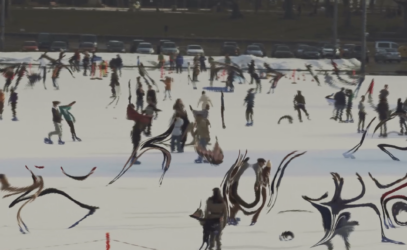
    I’ve successfully created a time dilation effect with simple panning shots using this workflow:

    1. Track and stabilize the background
    2. Apply time dilation to moving subjects (which correctly positions them in 3D space)
    3. Reverse the stabilization to get the final composite

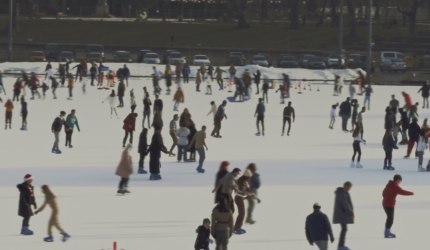
    This works perfectly for simple camera movements. You can see the results in the before/after images attached.

    Current Challenge:

    I’m now trying to achieve the same effect with a more complex camera move – specifically a camera that’s both pushing forward and panning while subjects move through the scene.

    Technical Setup:

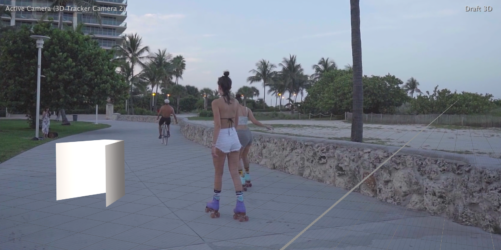
    • I’ve successfully tracked my camera data
    • Created a ground plane and null object
    • Attached a tracking shape to my null (visible as the white box in my screenshot)

    What I Need Help With:

    I need to stabilize the footage so that:

    1. The tracked shape (white box) remains perfectly static in 3D space from first to last frame
    2. The footage should rotate and move around this fixed point to maintain the shape’s perspective
    3. When I later apply time dilation and reverse the stabilization, subjects will appear in their correct 3D positions regardless of when they appear in time

    For example, if a roller skater is time-dilated so much that they appear in frame 1 when they should be far down the path (as in frame 100), they should still be positioned correctly in 3D space.

    Any suggestions on how to achieve this stabilization with a moving camera would be greatly appreciated!
    reinert wasserman replied 1 year, 1 month ago 3 Members · 3 Replies
  • 3 Replies
  • Graham Quince

    April 4, 2025 at 9:34 am

    So you want the background to appear normal, but have the characters distort?

    My first guess would be to rotoscope the characters and apply the distort to their cutout versions. But you might also need to use Content Aware Fill to remove them from the undistorted background (depending on what the first stage looks like).

  • Alex Todorov

    April 4, 2025 at 4:07 pm

    Hello, if I’ve understood you properly, you need to do a matchmoving, not stabilize. You need to:

    1. Add Effect> 3D Camera Tracker to your footage (if the size of your footage doesn’t fit composition size than you need to make pre-comp>Move all attributes) >

    >Shot type> Set what you need

    >Horizontal angle of view> Set what you need

    >Track point size>Increase (to see the rest of the crosses)

    2.Move a playhead on timeline and delete flickering crosses (when the cross appears on a few frames only). In order to delete, use Ctrl+left mouse button and drag>delete

    3. You need to choose the crosses that stay in their original positions longer and which are also not overlapped by other characters or items. Select this items>Right mouse button>Create camera and Null.

    4. Parent your shape to Null object (But your shape must be 3d object too!)>Shift+left mouse button to Parent pick whip

    5. Select all layers>make pre-comp>Move all attributes)

    6. Outside the pre-comp add Time Stretch or Time-Reverse Layer or Time Remapping

  • reinert wasserman

    April 9, 2025 at 12:05 pm

    That’s correct. I’ve done all of these and the object is just added to the shot as reference of whats happening in 3d space.

    The real goal is to effectively remove all camera movement from the shot as if it were static. without fixing the camera, when it pans right, the path and the characters on it move to the left of frame. When the camera pushes in, the path and the characters on it fill up more of the frame.

    If for instance, someone where walking down the path, I can take a retoscope of them at any point on the path and move it to any point in the timeline, and they will appear as the appropriate size and position in the frame, then I can reintroduce the camera movement. Without tracking the movement and locking the camera down first. If I were to move the characters in the timeline, their size and location in the frame would mismatch the current location of the camera .

We use anonymous cookies to give you the best experience we can.
Our Privacy policy | GDPR Policy