


Boris FX Sequoia Adds Dynamic Video Engine for Professional Audio Workflows

The high-end recording, editing, mixing, and mastering DAW streamlines video and audio post-production pipelines, delivers faster performance, and improves overall stability.
Boris FX, the award-winning post-production plugin and application developer, cements its position as a bridge between video and audio professionals with a major new release. Sequoia 2026 is now available with a powerful new GPU-accelerated video engine that drastically speeds up video and audio post-production workflows and offers audio engineers, mastering engineers, music producers, and sound editors a modern, more user-friendly experience.
Can’t see this video? Click here! If you are in Safari, hover over “Safari” in your menu, click “settings for creativecow.net” and toggle the “Auto-Play” to “Allow All Auto-Play”.
“We’re excited to introduce our first Sequoia release since the renowned DAW joined our product family last fall,” states Boris Yamnitsky, President and Founder of Boris FX. “The 2026 release reflects our commitment to provide best-in-class tools across audio, broadcast, and post-production workflows as they are inherently intertwined. Sequoia 2026 represents a giant leap forward for video and audio post-production workflows, includes deeper integrations, and has many under-the-hood refinements that help users work at their most efficient.”
“The audio and video engine improvements have had a significant impact on my workflow,” remarks Lukas Drozd, composer/producer. “Audio is now much more stable at any buffer size, hardware video decoding makes working with video far smoother, and the new OSC remote control is a great addition. Sequoia 2026 is a very strong release.”

Audio Post-Production
A new video engine meets the demands of today’s audio engineers and post-production studios. The fully GPU-accelerated engine (NVIDIA, AMD, Intel) delivers vital workflow enhancements and speedier performance. The engine supports modern codecs (AVC, HEVC, AV1), offers smoother playback with native Apple ProRes support, and features full-resolution monitoring without downscaling or reduced preview quality. Additionally, it improves overall responsiveness and supports higher frame rates up to 60 fps.

Sequoia 2026 further streamlines audio production with new OSC (Open Sound Control) remote support, which allows Sequoia to seamlessly integrate into complex studio infrastructures. Audio engineers using broadcast and large-format consoles, StreamDecks, or any OSC-based app can trigger the DAW’s recording, editing, mixing, and transport functions across a network, making it ideal for studios and multi-room setups.

Mastering & Producing
Sequoia 2026 empowers mastering engineers and high-end music producers to work at their most efficient on complex, multi-track, multi-plugin projects. The VST3 SDK audio engine receives a substantial performance boost, optimizing multicore performance through smarter CPU distribution. The update reduces unnecessary processing load on high-latency plugins, or AUX sends, and improves playback reliability through strengthened engine testing and error handling.
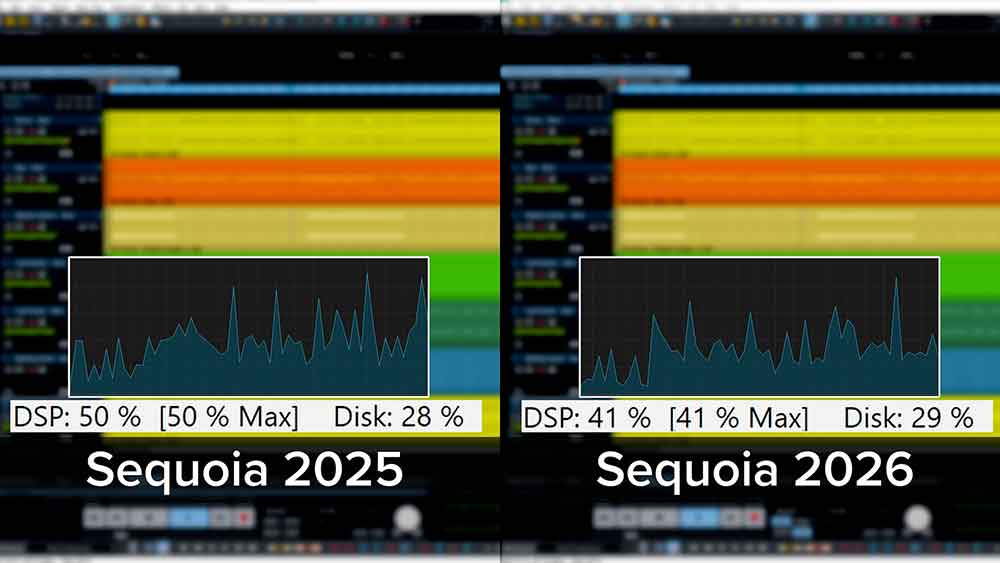
The release also adds a new optimized plugin buffer dialog and one-click exports that bypass any applied effects. These combined improvements provide a safer and more controlled working environment during critical mastering and editing tasks.
Sound Design
New Soundly integration gives users access to a large, cloud-based sound library with thousands of sound effects, Foley, atmospheres, and field recordings at various sample rates. The library includes search tools, built-in sound previews for instant auditioning, and an organized asset management system with custom libraries, tags, and favorites.
Users can seamlessly transfer any sound into Sequoia, speeding up workflows when adding theme music, stingers, and intros/outros across film and TV sound design, podcast and broadcast production, and post-production dialogue editing.

Can’t see this video? Click here! If you are in Safari, hover over “Safari” in your menu, click “settings for creativecow.net” and toggle the “Auto-Play” to “Allow All Auto-Play”.
The addition of an enhanced FX/IO Matrix also expands creative flexibility. The improvements allow detailed multi-channel signal routing through plugins, including channel remapping, side-chain configurations, and “Thru” mode for distributing mono or stereo effects across surround and immersive buses.

Editing
Sound editors and classical music producers gain speed and accuracy through Sequoia 2026’s reworked Crossfade Editor and a unified fade-shape workflow. Key highlights include better visual context and usability, instant real-time shape previews for faster fade and crossfade editing, quicker access to all fade shapes via the object handle, and the ability to easily apply precise fade curves and loop previews while editing without interrupting workflows.
Pricing
Sequoia is a standalone digital audio workstation (DAW) with subscription, perpetual, and upgrade & support renewal options. Prices start at $595/year or $95/month. See webshop for details.
Customers with active Sequoia or Boris FX Suite subscriptions, or with a Sequoia upgrade & support plan, receive the 2026 product release as a complimentary update. Learn more about Sequoia.
Enjoying the news? Sign up for the Creative COW Newsletter!
Sign up for the Creative COW newsletter and get weekly updates on industry news, forum highlights, jobs, inspirational tutorials, tips, burning questions, and more! Receive bulletins from the largest, longest-running community dedicated to supporting professionals working in film, video, and audio.
Enter your email address, and your first and last name below!


Responses