

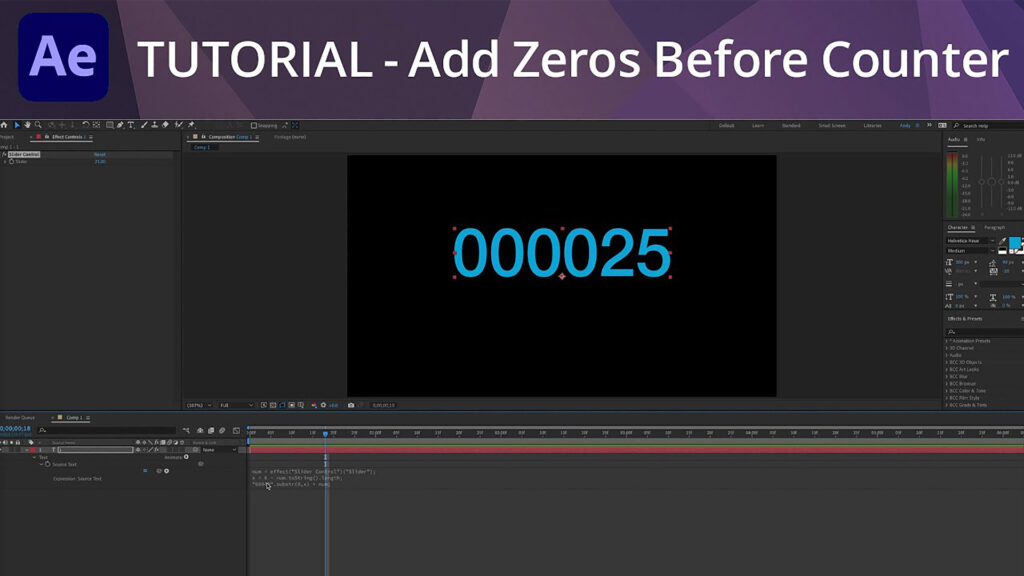
After Effects Tutorial – Add Zeros Before Counter

I’ve been asked many times about adding zeros in front of a number counter so that there are always a select number of digits appearing. A counter like this can be likened to a speedometer. This is done with expressions to pad your string.
As usual, the initial expression from linking a text layer source text to a slider control will be:
num = effect(“Slider Control”)(“Slider”);
Then, set the length of the string. If you want 6 digits to always show, use the following for another variable:
X = 6 – num.toString().length;
Then, one more line of code is needed to return the proper value. Basically, you will return the modified substring plus your original number that is controlled via slider control. The number of zeros in quotes varies depending on the number of digits you wish to return. Sticking with the 6-digit example, use the following:
“00000”.substr(0,x) + num;
Enjoying this tutorial? Sign up now for the Creative COW Newsletter!

Sign up for the Creative COW newsletter and get weekly updates on industry news, forum highlights, inspirational tutorials, tips, burning questions, and more! Receive bulletins from the largest, longest-running community dedicated to supporting professionals working in film, video, and audio.
Enter your email address, a first and last name, and let us know what you’d like to see more of in the message!
[contact-form-block name_label=”Name” email_label=”E-mail” message_label=”Message” header=”false” header_image_id=”null” header_image_size=”50″ header_image_align=”left” header_title=”Get in Touch” header_text=”Leave your message and we’ll get back to you shortly.” button_text=”Send” button_color=”#3d84f6″ button_text_color=”white” align=”undefined” theme=”default” message_rows=”5″][/contact-form-block]
Responses