

Activity › Forums › Adobe After Effects › How to Make GLow Streaks like Sprint AD?
-
How to Make GLow Streaks like Sprint AD?
Posted by Milton Hockman on February 8, 2009 at 4:16 pmHow do i make the glow streaks that are on the new Sprint Ads?
Sam Wells replied 17 years, 7 months ago 6 Members · 8 Replies -
8 Replies
-

Ron Lindeboom
February 8, 2009 at 4:20 pmTry this one…
https://library.creativecow.net/articles/kramer_andrew/nano.php
Best regards,
Ron Lindeboom
Creativity is a type of learning process where the teacher and pupil are located in the same individual.
-

Milton Hockman
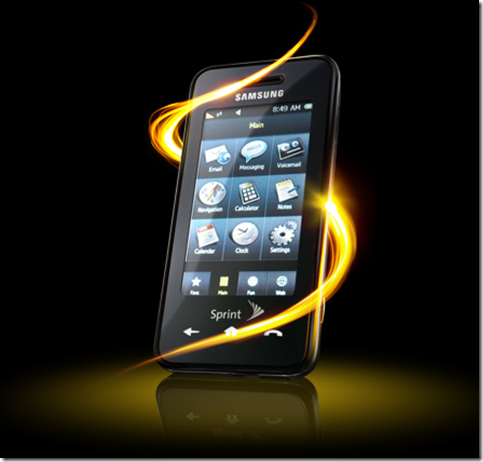
February 8, 2009 at 4:21 pmlet me clarify that i am talking about the ads where the cool glowing smoke wraps around the phone.
Motion Graphics Artist and Non-Linear Editor
Software expertise include: After Effects, Avid Xpress Pro, Final Cut Pro, Dvd Studio Pro, Photoshop, and more. -

David Johnson
February 8, 2009 at 5:37 pmIf I’m thinking of the right one, it was probably done with Trapcode 3D Stroke and Particular plugins (can be, but can also be done with a 3D app). Those are both very popular plugins (as is the effect you’re talking about) so I’m sure there are lots of tutorials available via a Google search that’ll give you the specifics. As with almost any third-party AE plugin, the same things can be done with AE’s native tools, but it takes more effort, creativity and time.
-
Milton Hockman
February 8, 2009 at 8:08 pmhow do i make streaks with a tapered point? like this
Motion Graphics Artist and Non-Linear Editor
Software expertise include: After Effects, Avid Xpress Pro, Final Cut Pro, Dvd Studio Pro, Photoshop, and more. -
Milton Hockman
February 8, 2009 at 8:09 pmor this

Motion Graphics Artist and Non-Linear Editor
Software expertise include: After Effects, Avid Xpress Pro, Final Cut Pro, Dvd Studio Pro, Photoshop, and more. -

Chris Heuer
February 9, 2009 at 2:41 amCheck out Trapcode Form.
https://www.trapcode.com/products_form.html
It creates more of that Ribbon effect, not just streaks. I don’t have it yet and I think it will take some time to learn, but Trapcode provides good tutorials to jump start you. Ron has a good point though. Watch Andrew’s tutorial on the Nano streaks. The technique might work well using other tools!
Chris Heuer
Freefall FX, LLC -

Nick Berrisford
February 9, 2009 at 10:14 pmTo get the tapered look you will need to try something like animating the custom particle so that it scales over time.
-

Sam Wells
February 10, 2009 at 6:12 pmLooks to me like that could be acheived using Trapcode Form and custom blurs and glows layered on from there, no plugin or preset would achieve that effect automatically.
Reply to this Discussion! Login or Sign Up