Creative Communities of the World Forums

The peer to peer support community for media production professionals.

Activity Forums Adobe After Effects make shape “particles” via repeater appear and disappear

  • make shape “particles” via repeater appear and disappear

    Posted by Patrick Grossien on February 17, 2025 at 5:49 pm

    Hey fellow motioneers,

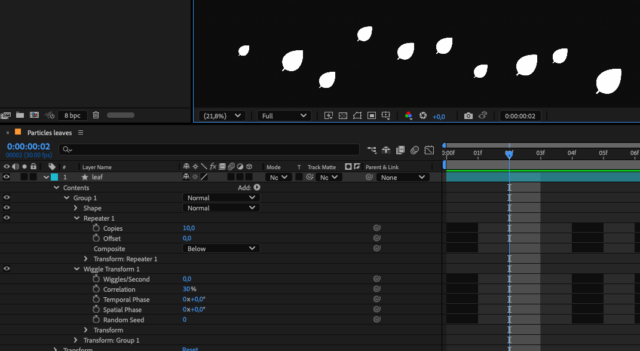
    I have a leaf shape with a repeater set to 10 copies. These are offset and transformed with wiggle transform (wiggles/sec set to 0), so now I have a line of static leaves blown in the wind. Now I want to individually turn these on and off so they appear and disappear one by one so that I only see 1 or 2 at a time – but I’m at a complete loss. 😂

    I thought I could set a second wiggle transform but of course it doesn’t do opacity. and scaling doesn’t seem to do the trick either to shut them off completely for a while.

    I hope I could describe it clear enough… Any ideas?

    John Fishback replied 1 year, 2 months ago 2 Members · 3 Replies
  • 3 Replies
  • John Fishback

    February 17, 2025 at 6:30 pm

    I’m not an expert in AE. You didn’t mention the background. How about placing a copy of the background over the leaves and masking it to reveal or hide the leaves. Not elegant, but might work.

  • Patrick Grossien

    February 17, 2025 at 6:34 pm

    Thank you very much, John. Very much appreciated!

    As this is not ending up as a singular element, I am trying to solve this with as little key framing as possible. That’s why I am trying to find a solution that targets the copies directly. But if not, I’ll need to resort to masking or other key framing solutions.

  • John Fishback

    February 17, 2025 at 6:44 pm

    I understand. Less is more.

We use anonymous cookies to give you the best experience we can.
Our Privacy policy | GDPR Policy